


Your Web UI, Your Window: Client-Side Decorations in Equo Chromium
Axel Orsingher on March 31st 2026
Build desktop applications with native performance, using your favorite web framework.
Desktop users don’t judge your application by “embedded browser standards”. They compare it to native applications.
That's where many desktop products get stuck. The web UI looks great, but the window still feels embedded with wrong title bars, limited branding, inconsistent resizing, and a UI that doesn't match your product identity.
When the window feels disconnected from the product, users subconsciously lower their expectations.
Visual polish and structural consistency are often associated with reliability and product maturity.
Client-Side Decorations (CSD) changes that.
What is Equo Chromium Standalone?
To understand what CSD means in practice, we first need to understand what Equo Chromium Standalone is.
Standalone mode lets you launch an Equo Chromium window directly from Java without any UI toolkit (no SWT, no Swing). Equo Chromium creates and manages the native window for you so that you can ship desktop applications with zero UI dependencies, ideal for web-first products, dashboards, and modern shells.
With CSD enabled, that Standalone window becomes frameless and fully customizable: your web UI owns the title bar, window buttons, and resize zones.
What sets Equo Chromium apart is that your backend stays in Java. Your UI is built with whatever web framework you prefer, and both sides communicate through Equo’s API. No new runtime, no new language for your backend, just your existing Java stack, with a modern web front end on top.
What is Client-Side Decoration?
Traditionally, the operating system draws the window chrome (the title bar, window buttons, and resize borders), which limits how much you can customize and brand your application.
With Client-Side Decoration, your application takes ownership of that area. Your title bar becomes part of your UI, so you can build a frameless window with a fully custom, on-brand desktop look.
- A title bar built in HTML/CSS.
- Custom window controls integrated into your UI.
- A consistent look across Windows, macOS, and Linux.
In practice, it looks like this:
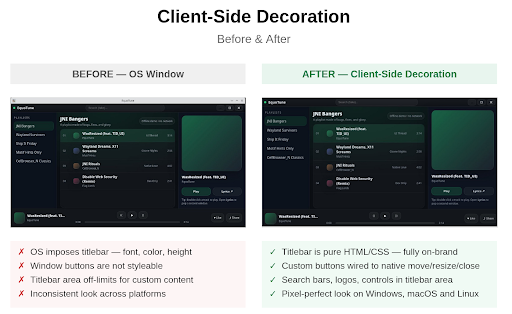
And the best part: none of this requires a UI toolkit. No SWT widgets, no Swing layout constraints — just your web UI, owning the entire window surface.
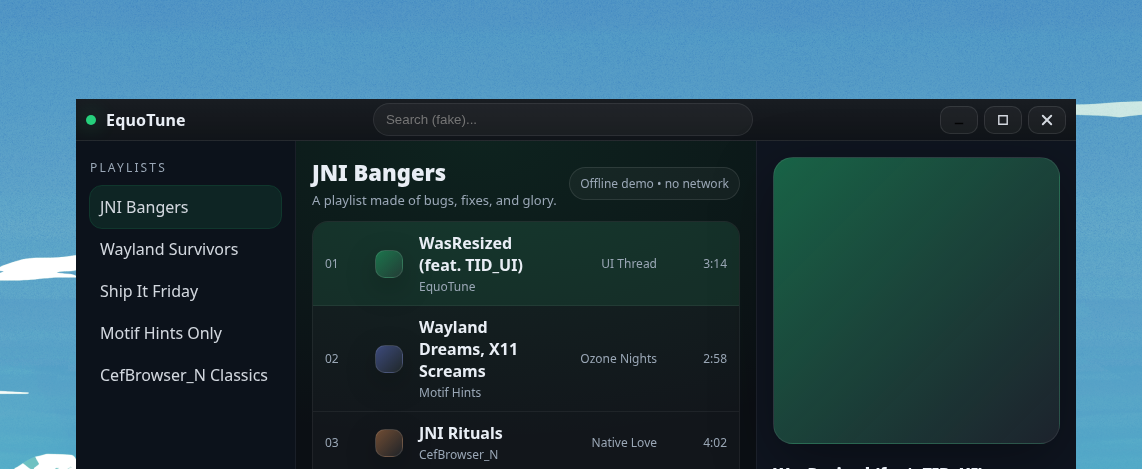
No OS frame. No wasted space. Your UI, edge to edge.
No UI Toolkit Required
Equo Chromium Standalone is designed for teams that want to build desktop applications the way modern products are built today:
- React
- Vue
- Angular
- Svelte
- Solid
- Any modern design system (e.g., Tailwind, Material, Ant, Chakra, Shadcn, etc.)
Your desktop UI becomes a web UI, but your window feels native.
What makes this different is that your backend stays in Java. Your team keeps the stack it already knows; no new runtime, no new language for the process layer. Just your web UI on top of a real Java application.
This approach is particularly well suited for:
- Web-first desktop products.
- Internal tools and dashboards.
- Modernization projects migrating from legacy UI stacks.
- Teams looking to reuse web expertise without sacrificing desktop quality.
Native Window Performance (What Actually Matters)
Custom windows often come with a tradeoff: beautiful UI, but sluggish or janky window behavior. Equo Chromium's Client Side Decorations is built to avoid that.
You get:
- OS-level move/resize behaviors.
- Smooth dragging and resizing.
- Proper window semantics (minimize/maximize/restore).
- A desktop feel that matches native applications.
This isn’t a “fake window drawn in a canvas”. It’s a real desktop window, with real desktop behaviors, but fully controlled by your UI.
What You Can Build with Client-Side Decorations
A branded desktop window that looks like your product
Your UI owns the entire surface:
- Top bars
- Navigation
- Toolbars
- Search
- Workspace layouts
- Dock-like side panels
No OS frame forcing a look that doesn’t match your design.
Web applications that finally feel like desktop applications
Building a desktop application with web technologies isn't just about rendering HTML inside a window. What separates a product that feels native from one that feels embedded is window-level UX, how the application moves, resizes, and responds to the user at the OS level. CSD closes that gap, giving your web UI the window behaviors users expect from desktop software.
Example Applications You Can Build with Equo Chromium Standalone + Client-Side Decorations
With Standalone (no UI toolkit) plus CSD (frameless + custom titlebar + move/resize), you can build the same window patterns used by modern desktop applications, entirely with web UI.
Discord-style desktop application
A custom titlebar, left navigation, multi-column workspace, and a main content area. Perfect for: chat applications, collaboration tools, live consoles, internal ops tools.
Slack-style workspace
Top search/command bar, workspace sidebar, channels list, threads panel, and message area, with a branded window frame that matches your product.
Spotify-style media application
Sidebar navigation, content grid, and a persistent bottom “player bar”, with window controls integrated into your UI (min/max/close), like real media desktop applications.
Notion-style editor/knowledge base
Minimal frameless window, top bar actions, left tree navigation, editor canvas, and optional right-side panel.
VS Code-style developer tool
Custom top bar, activity bar, explorer sidebar, tabs, split panes, great for IDE-like tools, log viewers, observability consoles, and admin frontends.
The Key Idea: Your UI Defines the Window
With Client-Side Decorations, the OS no longer decides where the draggable title bar is or where its resizing happens.
Your application defines:
- What area moves the window (your title bar)
- What borders resize the window (your edges)
- What buttons control state (min/max/close)
This is what elevates web applications to true enterprise-grade desktop experiences.
Why This Changes the Desktop Story
Embedding web content used to be about rendering pages. Today, it's about shipping an experience that feels modern, branded, and native, and Client-Side Decorations gives your team full control of the window to do exactly that.
Want to Build a Web-first Desktop Application?
If your product is:
- Migrating from legacy UI.
- Building a Standalone desktop shell for web applications.
- Delivering a branded, premium, and modern desktop experience.
Every product has its own constraints, stack, and goals. If yours fits any of the cases above, the Equo team can help you evaluate what this unlocks for your application specifically and share best practices from real implementations. Reach out and let's figure out the right solution together.