


Equo Chromium: New Window Management Features
Axel Orsingher on November 13th 2025
Meet the latest additions to Equo Chromium, designed to bring a more native, flexible experience to embedded browsers across toolkits.
Versions 128 and 138 introduce new window management APIs for controlling full-screen mode, window titles, and custom icons — enabling deeper system integration without complex native code.
Brief Context
Applications built with SWT, Swing, or Standalone Java UIs often need tighter integration with the underlying operating system — for instance, controlling window states or customizing the look and feel.
These new APIs simplify that process by providing a unified, modern interface for window management across platforms.
Fullscreen Support
Give your users a distraction-free experience with true full-screen mode. Perfect for dashboards, media players, data visualizations, or any application that deserves the entire screen.
Fullscreen mode now works seamlessly across all toolkits — SWT, Swing, and Standalone — and all operating systems with smooth transitions and complete control.
browser.setFullscreen(true);   // Enter fullscreen

browser.setFullscreen(false);  // Exit fullscreen

browser.toggleFullscreen();    // Toggle dynamically
Whether triggered from your UI or via JavaScript’s requestFullscreen(), your application stays perfectly in sync with web content.
Custom Window Title (Standalone Only)
Custom Window Titles — Clear and Polished
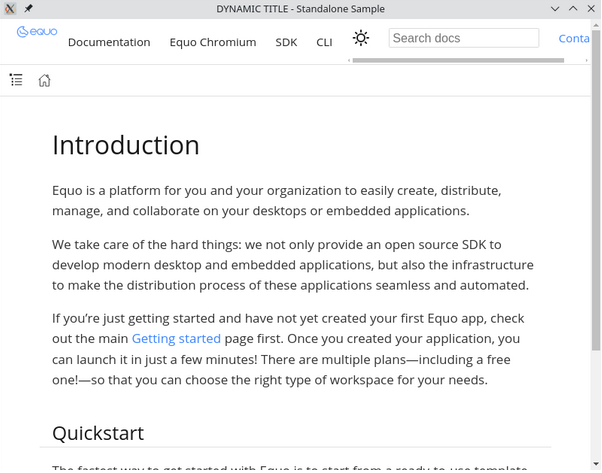
Add a personalized touch to your Standalone windows with your own window titles.
Define them directly when creating the browser — ideal for branding, product names, or dynamic context like “Dashboard” or “Settings.”
ChromiumBrowser browser =
  ChromiumBrowser.standalone("https://example.com", "Analytics Dashboard", new Rectangle(100,100,800,600));
You can also update the title dynamically at runtime — perfect for applications that change their state or context:
browser.setWindowTitle("Dynamic title");
A simple change that instantly elevates the look and professionalism of your application.
Window Icon Customization (Windows + Standalone Only)
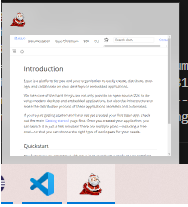
Your application deserves its own presence in the OS.
Now Standalone windows on Windows can display a custom .ico file, giving your product a visual identity across the taskbar, Alt-Tab view, and title bar.
browser.setWindowIcon("C:\\icons\\brand_logo.ico");
Windows automatically adjusts the icon to fit both small and large display contexts — ensuring crisp, native visuals everywhere.
Need More?
If you want to go further and take full control of the window frame itself, replacing the native title bar and borders with your own web UI, Client-Side Decorations in Equo Chromium is the natural next step.
To learn more about how Equo Chromium can provide modern web integrations for your application, visit our GitHub repository or contact us to discuss a modernization prototype.