package dev.equo;

import dev.equo.swt.Config;
import org.eclipse.swt.SWT;
import org.eclipse.swt.layout.FillLayout;
import org.eclipse.swt.layout.GridData;
import org.eclipse.swt.layout.GridLayout;
import org.eclipse.swt.widgets.*;

/**
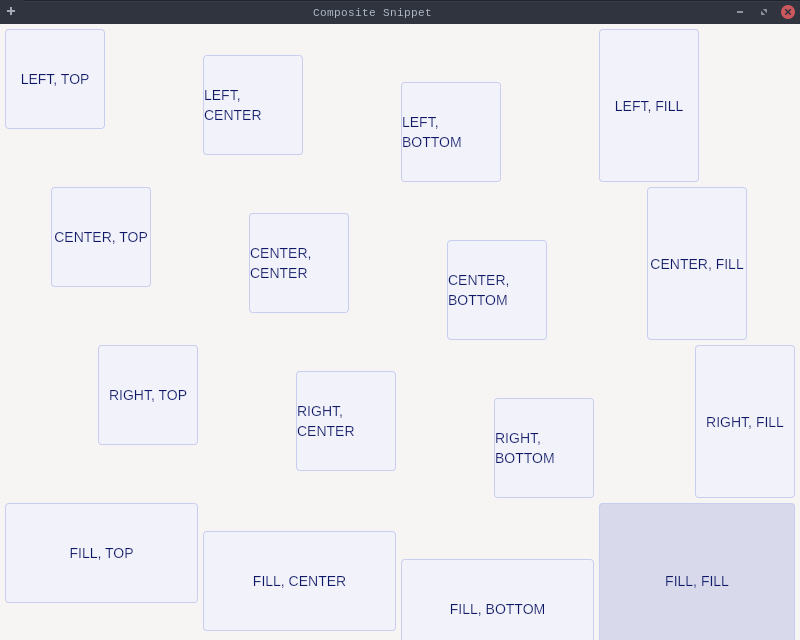
 * Demonstrates the use of Composite with GridLayout and various GridData alignment options.
 * Shows how to position buttons using different horizontal and vertical alignment combinations.
 */
public class CompositeSnippet {
    public static void main(String[] args) {
        Config.useEquo(Composite.class);
        Display display = new Display();
        Shell shell = new Shell(display);
        shell.setText("Composite Snippet");
        shell.setLayout(new FillLayout());

        Composite comp = createButtons(shell);
        new Label(comp, SWT.BORDER);
        comp = createButtons(comp);
        comp.setLayoutData(new GridData(SWT.FILL, SWT.FILL, true, true, 3, 1));

        shell.open ();
        while (!shell.isDisposed ()) {
            if (!display.readAndDispatch ()) display.sleep ();
        }
        display.dispose ();
    }

    private static Composite createButtons(Composite parent) {
        Composite composite = new Composite(parent, SWT.BORDER);
        composite.setLayout(new GridLayout(4, false));

        Button b = new Button(composite, SWT.PUSH);
        b.setText("LEFT, TOP");
        b.setLayoutData(new GridData(SWT.LEFT, SWT.TOP, true, true, 1, 1));
        b = new Button(composite, SWT.PUSH);
        b.setText("LEFT, CENTER");
        b.setLayoutData(new GridData(SWT.LEFT, SWT.CENTER, true, true, 1, 1));
        b = new Button(composite, SWT.PUSH);
        b.setText("LEFT, BOTTOM");
        b.setLayoutData(new GridData(SWT.LEFT, SWT.BOTTOM, true, true, 1, 1));
        b = new Button(composite, SWT.PUSH);
        b.setText("LEFT, FILL");
        b.setLayoutData(new GridData(SWT.LEFT, SWT.FILL, true, true, 1, 1));
        b = new Button(composite, SWT.PUSH);
        b.setText("CENTER, TOP");
        b.setLayoutData(new GridData(SWT.CENTER, SWT.TOP, true, true, 1, 1));
        b = new Button(composite, SWT.PUSH);
        b.setText("CENTER, CENTER");
        b.setLayoutData(new GridData(SWT.CENTER, SWT.CENTER, true, true, 1, 1));
        b = new Button(composite, SWT.PUSH);
        b.setText("CENTER, BOTTOM");
        b.setLayoutData(new GridData(SWT.CENTER, SWT.BOTTOM, true, true, 1, 1));
        b = new Button(composite, SWT.PUSH);
        b.setText("CENTER, FILL");
        b.setLayoutData(new GridData(SWT.CENTER, SWT.FILL, true, true, 1, 1));
        b = new Button(composite, SWT.PUSH);
        b.setText("RIGHT, TOP");
        b.setLayoutData(new GridData(SWT.RIGHT, SWT.TOP, true, true, 1, 1));
        b = new Button(composite, SWT.PUSH);
        b.setText("RIGHT, CENTER");
        b.setLayoutData(new GridData(SWT.RIGHT, SWT.CENTER, true, true, 1, 1));
        b = new Button(composite, SWT.PUSH);
        b.setText("RIGHT, BOTTOM");
        b.setLayoutData(new GridData(SWT.RIGHT, SWT.BOTTOM, true, true, 1, 1));
        b = new Button(composite, SWT.PUSH);
        b.setText("RIGHT, FILL");
        b.setLayoutData(new GridData(SWT.RIGHT, SWT.FILL, true, true, 1, 1));
        b = new Button(composite, SWT.PUSH);
        b.setText("FILL, TOP");
        b.setLayoutData(new GridData(SWT.FILL, SWT.TOP, true, true, 1, 1));
        b = new Button(composite, SWT.PUSH);
        b.setText("FILL, CENTER");
        b.setLayoutData(new GridData(SWT.FILL, SWT.CENTER, true, true, 1, 1));
        b = new Button(composite, SWT.PUSH);
        b.setText("FILL, BOTTOM");
        b.setLayoutData(new GridData(SWT.FILL, SWT.BOTTOM, true, true, 1, 1));
        b = new Button(composite, SWT.PUSH);
        b.setText("FILL, FILL");
        b.setLayoutData(new GridData(SWT.FILL, SWT.FILL, true, true, 1, 1));

        return composite;
    }
}