Skip to content

Sash Examples

Instances of the receiver represent a selectable user interface object that allows the user to drag a rubber banded outline of the sash within the parent control.

Example

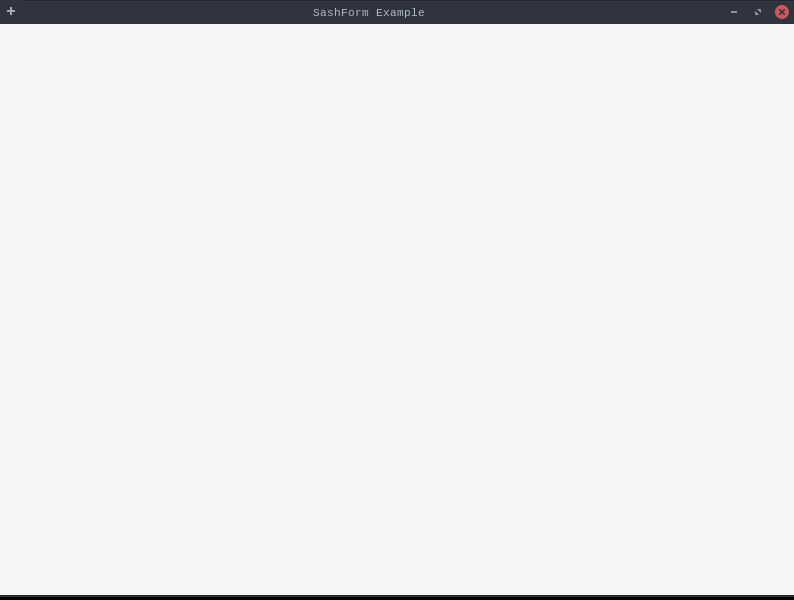
Sash  Example

Example demonstrating SashExample.

SashExample.java
package dev.equo;

import dev.equo.swt.Config;
import org.eclipse.swt.SWT;
import org.eclipse.swt.custom.SashForm;
import org.eclipse.swt.custom.CTabFolder;
import org.eclipse.swt.custom.CTabItem;
import org.eclipse.swt.widgets.Display;
import org.eclipse.swt.widgets.Shell;
import org.eclipse.swt.widgets.Text;

public class SashExample {

    public static void main(String[] args) {
        System.setProperty("dev.equo.swt.debug", "true");
//        System.setProperty("dev.equo.swt.Comopsite", "equo");
        Config.forceEquo();
        Display display = new Display();
        Shell shell = new Shell(display);
        shell.setText("SashForm Example");
        shell.setSize(800, 600);
        shell.setLayout(null);

        // Sash horizontal (divide izquierda / derecha)
        SashForm sash = new SashForm(shell, SWT.HORIZONTAL);
        sash.setBounds(0, 0, 800, 600);

        // Lado izquierdo (simula una vista)
        CTabFolder leftFolder = new CTabFolder(sash, SWT.BORDER);
        CTabItem leftTab = new CTabItem(leftFolder, SWT.NONE);
        leftTab.setText("Vista");
        leftTab.setControl(new Text(leftFolder, SWT.MULTI));

        // Lado derecho (simula editor)
        CTabFolder rightFolder = new CTabFolder(sash, SWT.BORDER);
        CTabItem rightTab = new CTabItem(rightFolder, SWT.NONE);
        rightTab.setText("Editor");
        rightTab.setControl(new Text(rightFolder, SWT.MULTI));

        // Proporción inicial (30% - 70%)
        sash.setWeights(new int[] {30, 70});

        shell.open();
        while (!shell.isDisposed()) {
            if (!display.readAndDispatch())
                display.sleep();
        }
        display.dispose();
    }
}

View on GitHub

Form Snippet

Sash  Form Snippet

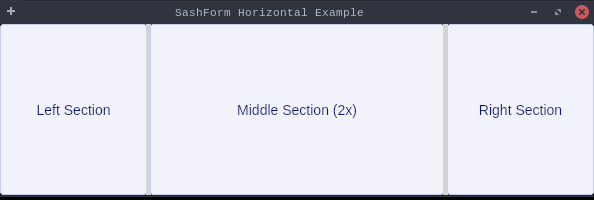
Demonstrates a horizontal SashForm with three resizable sections.

This example creates a shell with a SashForm containing three buttons.

Users can drag the sashes between sections to resize them.

The sections are initially sized with weights [1, 2, 1] meaning the middle

section is twice as large as the side sections.

SashFormSnippet.java
package dev.equo;

import dev.equo.swt.Config;
import org.eclipse.swt.SWT;
import org.eclipse.swt.custom.SashForm;
import org.eclipse.swt.layout.FillLayout;
import org.eclipse.swt.widgets.*;

/**
 * Demonstrates a horizontal SashForm with three resizable sections.
 * This example creates a shell with a SashForm containing three buttons.
 * Users can drag the sashes between sections to resize them.
 * The sections are initially sized with weights [1, 2, 1] meaning the middle
 * section is twice as large as the side sections.
 */
public class SashFormSnippet {
    public static void main(String[] args) {
        Config.forceEquo();

        Display display = new Display();
        Shell shell = new Shell(display);
        shell.setText("SashForm Horizontal Example");
        shell.setLayout(new FillLayout());

        // Create horizontal SashForm
        SashForm sashForm = new SashForm(shell, SWT.HORIZONTAL);

        // Add three buttons as children
        Button button1 = new Button(sashForm, SWT.PUSH);
        button1.setText("Left Section");

        Button button2 = new Button(sashForm, SWT.PUSH);
        button2.setText("Middle Section (2x)");

        Button button3 = new Button(sashForm, SWT.PUSH);
        button3.setText("Right Section");

        // Set weights: middle section is twice as wide
        sashForm.setWeights(new int[]{1, 2, 1});

        shell.setSize(600, 200);
        shell.open();

        while (!shell.isDisposed()) {
            if (!display.readAndDispatch()) display.sleep();
        }
        display.dispose();
    }
}

View on GitHub

Form Vertical Snippet

Sash  Form Vertical Snippet

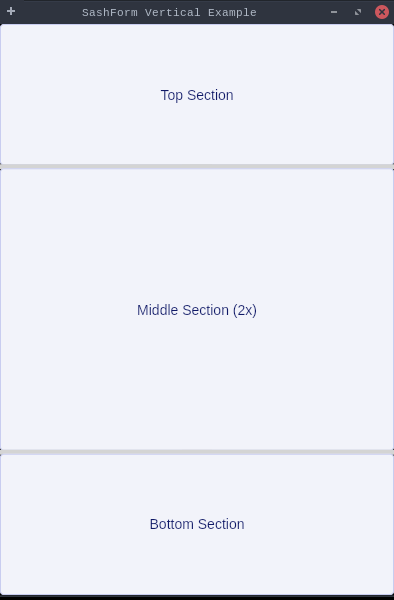
Demonstrates a vertical SashForm with three resizable sections.

This example creates a shell with a SashForm containing three buttons.

Users can drag the sashes between sections to resize them.

The sections are initially sized with weights [1, 2, 1] meaning the middle

section is twice as large as the side sections.

SashFormVerticalSnippet.java
package dev.equo;

import dev.equo.swt.Config;
import org.eclipse.swt.SWT;
import org.eclipse.swt.custom.SashForm;
import org.eclipse.swt.layout.FillLayout;
import org.eclipse.swt.widgets.*;

/**
 * Demonstrates a vertical SashForm with three resizable sections.
 * This example creates a shell with a SashForm containing three buttons.
 * Users can drag the sashes between sections to resize them.
 * The sections are initially sized with weights [1, 2, 1] meaning the middle
 * section is twice as large as the side sections.
 */
public class SashFormVerticalSnippet {
    public static void main(String[] args) {
        Config.forceEquo();

        Display display = new Display();
        Shell shell = new Shell(display);
        shell.setText("SashForm Vertical Example");
        shell.setLayout(new FillLayout());

        // Create vertical SashForm
        SashForm sashForm = new SashForm(shell, SWT.VERTICAL);

        // Add three buttons as children
        Button button1 = new Button(sashForm, SWT.PUSH);
        button1.setText("Top Section");

        Button button2 = new Button(sashForm, SWT.PUSH);
        button2.setText("Middle Section (2x)");

        Button button3 = new Button(sashForm, SWT.PUSH);
        button3.setText("Bottom Section");

        // Set weights: middle section is twice as tall
        sashForm.setWeights(new int[]{1, 2, 1});

        shell.setSize(400, 600);
        shell.open();

        while (!shell.isDisposed()) {
            if (!display.readAndDispatch()) display.sleep();
        }
        display.dispose();
    }
}

View on GitHub