Skip to content

Canvas Examples

Instances of this class provide a surface for drawing arbitrary graphics.

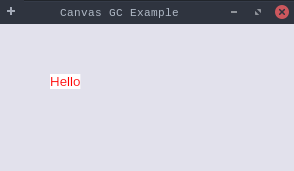
Example

Canvas  Example

Example demonstrating CanvasExample.

CanvasExample.java
package dev.equo.internal;
import org.eclipse.swt.SWT;
import org.eclipse.swt.widgets.*;
import org.eclipse.swt.layout.FillLayout;
import org.eclipse.swt.graphics.Color;
import org.eclipse.swt.graphics.GC;

public class CanvasExample {

    static Color textColor;
    static int y = 50;

    public static void main(String[] args) {
//        Config.forceEclipse();
        Display display = new Display();
        Shell shell = new Shell(display);
        shell.setText("Canvas GC Example");
        shell.setSize(300, 200);
        shell.setLayout(new FillLayout());

        Canvas canvas = new Canvas(shell, SWT.NONE);

        textColor = display.getSystemColor(SWT.COLOR_RED);

        canvas.addPaintListener(e -> {
            GC gc = e.gc;
            gc.setForeground(textColor);
            gc.drawString("Hello", 50, y);
        });

        shell.open();

        display.timerExec(2000, () -> {
            textColor = display.getSystemColor(SWT.COLOR_GREEN);
            y = 90;
            canvas.redraw();
        });

        while (!shell.isDisposed()) {
            if (!display.readAndDispatch())
                display.sleep();
        }

        display.dispose();
    }
}

View on GitHub

Paint Listener Inherited Image Snippet

Canvas  Paint Listener Inherited Image Snippet

A login-screen shape: a Shell with a backgroundImage forced onto its children

(INHERIT_FORCE) and a Canvas that never sets a background of its own but draws a status line

from a PaintListener.

SWT erases the Canvas to the inherited image before the listener runs, so the text must land

on the image with nothing else visible -- a solid slab where the Canvas sits means the GC erase

resolved to a color instead of staying transparent for the image painted underneath.

Swap Config.forceEquo() for Config.forceEclipse() (runEmbedExample) for the native baseline.

CanvasPaintListenerInheritedImageSnippet.java
package dev.equo;

import dev.equo.swt.Config;
import org.eclipse.swt.SWT;
import org.eclipse.swt.graphics.Color;
import org.eclipse.swt.graphics.Image;
import org.eclipse.swt.graphics.ImageData;
import org.eclipse.swt.graphics.PaletteData;
import org.eclipse.swt.layout.FormAttachment;
import org.eclipse.swt.layout.FormData;
import org.eclipse.swt.layout.FormLayout;
import org.eclipse.swt.widgets.Canvas;
import org.eclipse.swt.widgets.Display;
import org.eclipse.swt.widgets.Shell;

/**
 * A login-screen shape: a Shell with a backgroundImage forced onto its children
 * (INHERIT_FORCE) and a Canvas that never sets a background of its own but draws a status line
 * from a PaintListener.
 *
 * SWT erases the Canvas to the inherited image before the listener runs, so the text must land
 * on the image with nothing else visible -- a solid slab where the Canvas sits means the GC erase
 * resolved to a color instead of staying transparent for the image painted underneath.
 *
 * Swap Config.forceEquo() for Config.forceEclipse() (runEmbedExample) for the native baseline.
 */
public class CanvasPaintListenerInheritedImageSnippet {

    public static void main(String[] args) {
        Config.forceEquo();
        Display display = new Display();
        Shell shell = new Shell(display);
        shell.setText("CanvasPaintListenerInheritedImageSnippet");
        shell.setSize(800, 600);
        shell.setBackground(new Color(display, 240, 240, 240));
        shell.setBackgroundImage(stripes(display));
        shell.setBackgroundMode(SWT.INHERIT_FORCE);
        shell.setLayout(new FormLayout());

        Canvas infoArea = new Canvas(shell, SWT.NONE);
        FormData data = new FormData();
        data.height = 200;
        data.left = new FormAttachment(5, 0);
        data.right = new FormAttachment(95, 0);
        data.bottom = new FormAttachment(95, 0);
        infoArea.setLayoutData(data);
        infoArea.addPaintListener(e -> {
            String infoText = "Waiting for connection ....";
            int textHeight = e.gc.stringExtent(infoText).y;
            e.gc.setForeground(display.getSystemColor(SWT.COLOR_BLACK));
            e.gc.drawText(infoText, 0, infoArea.getSize().y - textHeight, true);
        });

        shell.open();
        while (!shell.isDisposed()) {
            if (!display.readAndDispatch())
                display.sleep();
        }
        display.dispose();
    }

    /**
     * Diagonal stripes as pixel data, the way an image loaded from a file arrives: an opaque slab
     * over them is unmistakable, a transparent Canvas invisible. (Painting them through a GC on an
     * Image would take the remote-render path, which a backgroundImage does not display.)
     */
    private static Image stripes(Display display) {
        int width = 800, height = 600;
        ImageData data = new ImageData(width, height, 24, new PaletteData(0xFF0000, 0x00FF00, 0x0000FF));
        int base = (205 << 16) | (215 << 8) | 235;
        int stripe = (120 << 16) | (140 << 8) | 190;
        for (int y = 0; y < height; y++) {
            for (int x = 0; x < width; x++) {
                data.setPixel(x, y, ((x + y) / 20) % 2 == 0 ? base : stripe);
            }
        }
        return new Image(display, data);
    }
}

View on GitHub