Device Examples
A Device widget component.
Zoom Snippet
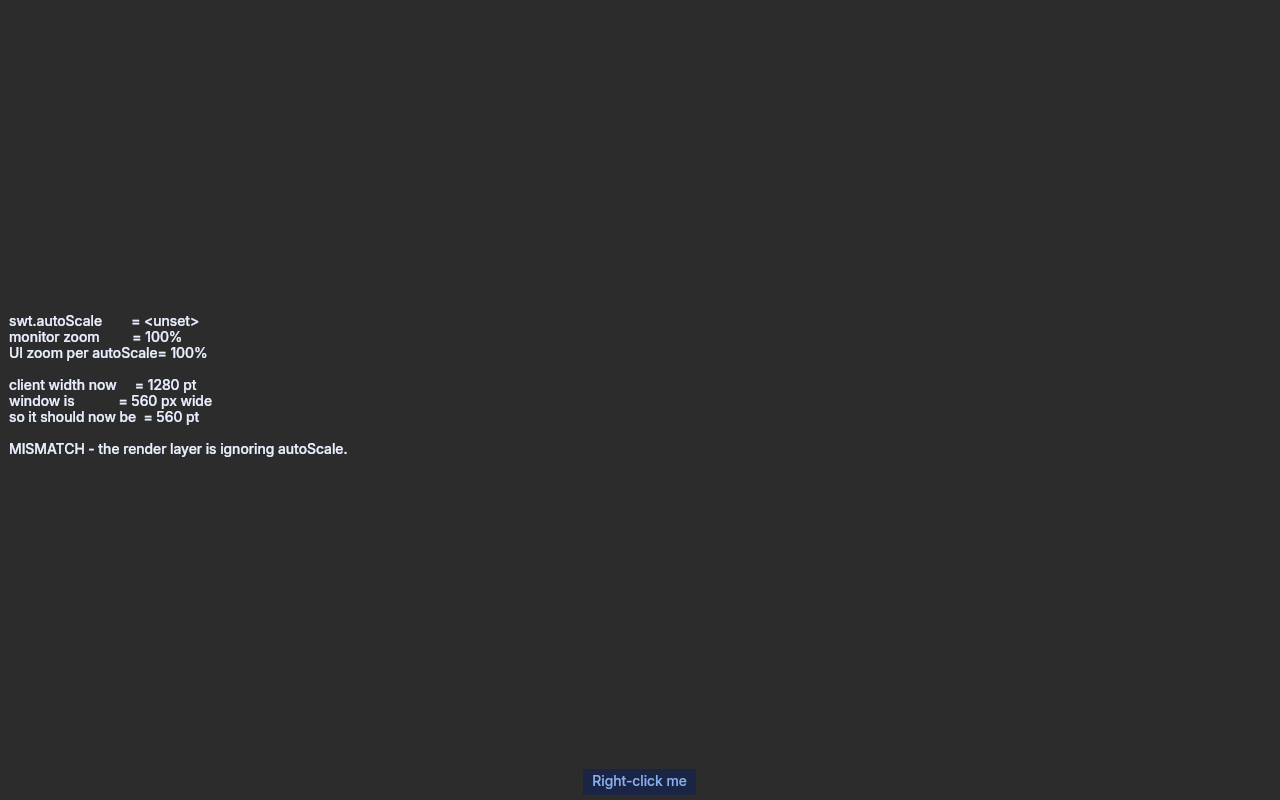
Shows the zoom SWT says the UI is drawn at next to the zoom the UI is actually drawn at.
{@code swt.autoScale} is a policy that turns the monitor's zoom into the zoom of the UI, and SWT
expects every size to be expressed at the latter. So {@code Display.getBounds()} is the whole test:
it must report the screen divided by {@code deviceZoom}, not by the monitor's own zoom.
Run it against a scaled monitor:
 ./gradlew :swt-evolve:examples:runDeskExample -PmainClass=dev.equo.DeviceZoomSnippet \

     -Dswt.autoScale=integer
On a display at 100% every mode agrees, so force them apart instead — an explicit percentage needs
monitor-specific scaling off, which is what rejects a mode it cannot honour:
-Dswt.autoScale.updateOnRuntime=false -Dswt.autoScale=200
Right-clicking the button opens a native {@code Menu}: it is positioned through SWT's own
coordinate mapping, so it lands correctly only while the two zooms agree.
??? example "DeviceZoomSnippet.java"
| package dev.equo;
import org.eclipse.swt.SWT;
import org.eclipse.swt.graphics.Rectangle;
import org.eclipse.swt.internal.DPIUtil;
import org.eclipse.swt.layout.GridData;
import org.eclipse.swt.layout.GridLayout;
import org.eclipse.swt.widgets.*;
/**
* Shows the zoom SWT says the UI is drawn at next to the zoom the UI is actually drawn at.
* <p>
* {@code swt.autoScale} is a policy that turns the monitor's zoom into the zoom of the UI, and SWT
* expects every size to be expressed at the latter. So {@code Display.getBounds()} is the whole test:
* it must report the screen divided by {@code deviceZoom}, not by the monitor's own zoom.
* <p>
* Run it against a scaled monitor:
* <pre>
* ./gradlew :swt-evolve:examples:runDeskExample -PmainClass=dev.equo.DeviceZoomSnippet \
* -Dswt.autoScale=integer
* </pre>
* On a display at 100% every mode agrees, so force them apart instead — an explicit percentage needs
* monitor-specific scaling off, which is what rejects a mode it cannot honour:
* <pre>
* -Dswt.autoScale.updateOnRuntime=false -Dswt.autoScale=200
* </pre>
* Right-clicking the button opens a native {@code Menu}: it is positioned through SWT's own
* coordinate mapping, so it lands correctly only while the two zooms agree.
*/
public class DeviceZoomSnippet {
public static void main(String[] args) {
Display display = new Display();
Shell shell = new Shell(display);
shell.setText("Device zoom");
shell.setLayout(new GridLayout(1, false));
shell.setSize(560, 380);
Label report = new Label(shell, SWT.WRAP);
report.setLayoutData(new GridData(SWT.FILL, SWT.FILL, true, true));
Button button = new Button(shell, SWT.PUSH);
button.setText("Right-click me");
button.setLayoutData(new GridData(SWT.CENTER, SWT.CENTER, true, false));
Menu contextMenu = new Menu(button);
button.setMenu(contextMenu);
for (String label : new String[] { "First entry", "Second entry", "Third entry" }) {
new MenuItem(contextMenu, SWT.PUSH).setText(label);
}
// The render layer connects after this runs, and only then does it learn the zoom to draw
// at, so the first reading is always the pre-handshake one. Print every reading instead.
Runnable refresh = () -> {
if (report.isDisposed()) return;
String text = describe(shell);
report.setText(text);
System.out.println("[zoom]\n" + text);
};
display.addListener(SWT.Resize, e -> refresh.run());
shell.addListener(SWT.Resize, e -> refresh.run());
display.timerExec(4000, refresh);
refresh.run();
shell.open();
while (!shell.isDisposed()) {
if (!display.readAndDispatch()) display.sleep();
}
display.dispose();
}
// The window keeps the pixels it was given; what the zoom changes is how many points SWT is told
// fit inside them. This first reading is taken before the render layer has connected, so it is
// still drawing at the monitor's zoom and the width below is that many real pixels.
private static int firstWidth;
private static int pixelWidth;
private static String describe(Shell shell) {
int nativeZoom = DPIUtil.getNativeDeviceZoom();
int deviceZoom = DPIUtil.getDeviceZoom();
Rectangle area = shell.getClientArea();
if (firstWidth == 0) {
firstWidth = area.width;
pixelWidth = Math.round(firstWidth * nativeZoom / 100f);
}
// Width only: the height also loses whatever chrome the render layer draws above the
// content, which is not a zoom effect and does not divide.
int expectedWidth = Math.round(pixelWidth * 100f / deviceZoom);
boolean ok = Math.abs(area.width - expectedWidth) <= 1;
StringBuilder sb = new StringBuilder();
sb.append("swt.autoScale = ").append(System.getProperty("swt.autoScale", "<unset>")).append('\n');
sb.append("monitor zoom = ").append(nativeZoom).append("%\n");
sb.append("UI zoom per autoScale= ").append(deviceZoom).append("%\n\n");
sb.append("client width now = ").append(area.width).append(" pt\n");
sb.append("window is = ").append(pixelWidth).append(" px wide\n");
sb.append("so it should now be = ").append(expectedWidth).append(" pt\n");
sb.append('\n');
sb.append(ok
? "OK - the render layer is drawing at the zoom autoScale asked for."
: "MISMATCH - the render layer is ignoring autoScale.");
return sb.toString();
}
}
|