Skip to content

ToolBar Examples

Instances of this class support the layout of selectable tool bar items.

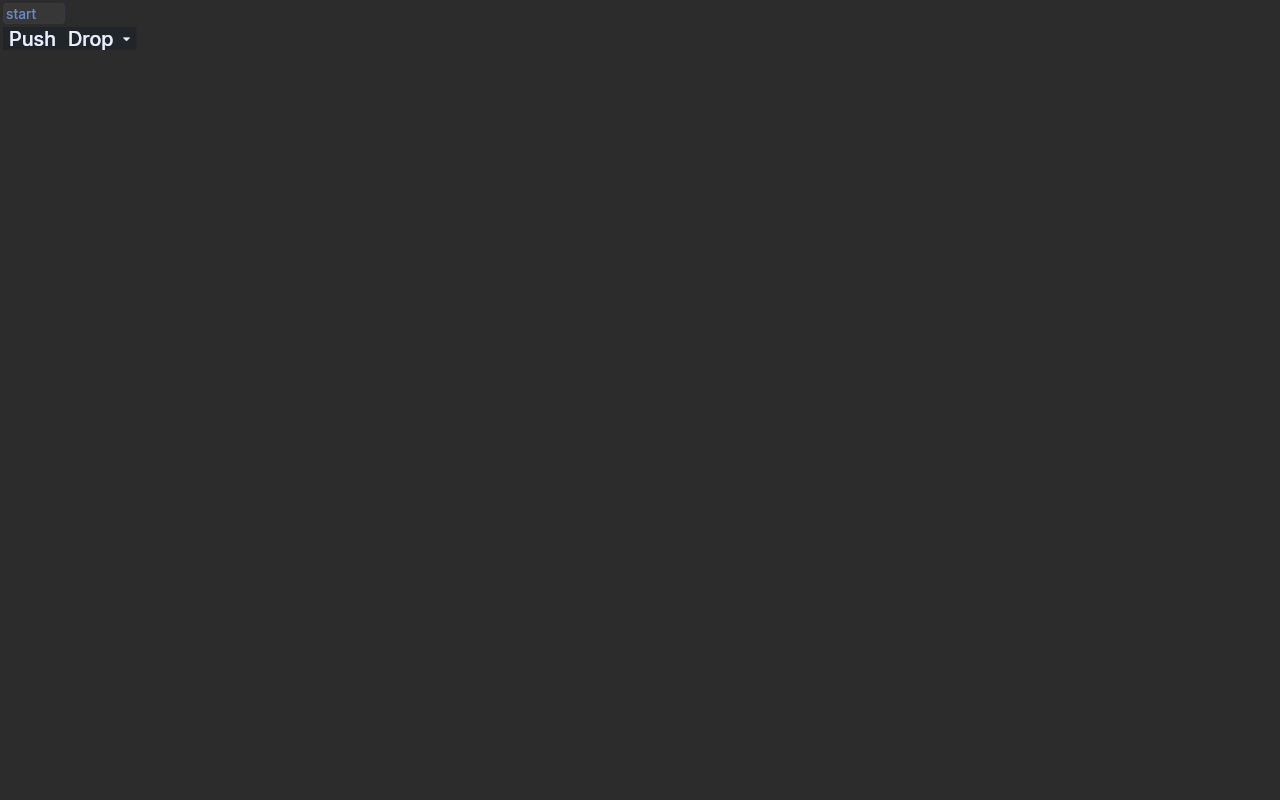
ToolBar  Drop Down Keyboard Snippet

A ToolBar DROP_DOWN item driven from the keyboard. Tab moves focus into the ToolBar, Right moves to

the drop-down item, and Down fires Selection with detail ARROW; the listener then shows the item's

menu below it, as applications do. Every event is printed with a [repro] prefix. Run with

{@code --drive} to send the keys with java.awt.Robot. For the native baseline, call

Config.defaultToEclipse() in place of the useEquo lines and run it with runEmbedExample.

ToolBarDropDownKeyboardSnippet.java
package dev.equo.internal;

import dev.equo.swt.Config;
import org.eclipse.swt.SWT;
import org.eclipse.swt.graphics.Point;
import org.eclipse.swt.graphics.Rectangle;
import org.eclipse.swt.layout.RowLayout;
import org.eclipse.swt.widgets.*;

import java.awt.Robot;
import java.awt.event.InputEvent;
import java.awt.event.KeyEvent;
import java.util.Arrays;

/**
 * A ToolBar DROP_DOWN item driven from the keyboard. Tab moves focus into the ToolBar, Right moves to
 * the drop-down item, and Down fires Selection with detail ARROW; the listener then shows the item's
 * menu below it, as applications do. Every event is printed with a [repro] prefix. Run with
 * {@code --drive} to send the keys with java.awt.Robot. For the native baseline, call
 * Config.defaultToEclipse() in place of the useEquo lines and run it with runEmbedExample.
 */
public class ToolBarDropDownKeyboardSnippet {
    public static void main(String[] args) throws Exception {
        Config.useEquo(ToolBar.class);
        Config.useEquo(Text.class);
        Config.useEquo(Menu.class);
        Config.useEquo(MenuItem.class);

        Display display = new Display();
        Shell shell = new Shell(display);
        shell.setText("ToolBarDropDownKeyboardSnippet");
        shell.setLayout(new RowLayout(SWT.VERTICAL));

        Text start = new Text(shell, SWT.BORDER);
        start.setText("start");
        ToolBar toolBar = new ToolBar(shell, SWT.FLAT);
        toolBar.addListener(SWT.FocusIn, e -> log("ToolBar FocusIn"));
        ToolItem push = new ToolItem(toolBar, SWT.PUSH);
        push.setText("Push");
        push.addListener(SWT.Selection, e -> log("Push Selection"));
        ToolItem drop = new ToolItem(toolBar, SWT.DROP_DOWN);
        drop.setText("Drop");

        Menu menu = new Menu(shell, SWT.POP_UP);
        menu.addListener(SWT.Show, e -> log("Menu Show"));
        menu.addListener(SWT.Hide, e -> log("Menu Hide"));
        for (String s : new String[] {"One", "Two"}) {
            MenuItem item = new MenuItem(menu, SWT.PUSH);
            item.setText(s);
            item.addListener(SWT.Selection, e -> log("MenuItem Selection " + s));
        }
        drop.addListener(SWT.Selection, e -> {
            log("Drop Selection detail=" + (e.detail == SWT.ARROW ? "ARROW" : String.valueOf(e.detail)));
            if (e.detail == SWT.ARROW) {
                Rectangle rect = drop.getBounds();
                Point pt = toolBar.toDisplay(rect.x, rect.y + rect.height);
                menu.setLocation(pt);
                menu.setVisible(true);
            }
        });
        display.addFilter(SWT.KeyDown, e -> log("KeyDown keyCode=" + e.keyCode + " stateMask=" + e.stateMask + " on " + e.widget));

        shell.setSize(300, 160);
        shell.open();
        start.setFocus();
        if (Arrays.asList(args).contains("--drive")) drive(display, shell, start, toolBar);
        while (!shell.isDisposed()) {
            if (!display.readAndDispatch()) display.sleep();
        }
        display.dispose();
        System.exit(0);
    }

    static void drive(Display display, Shell shell, Control first, ToolBar toolBar) {
        Thread t = new Thread(() -> {
            try {
                Robot r = new Robot();
                r.delay(6000);
                activate(r, display, shell, first);
                display.syncExec(() -> log("focus control: " + display.getFocusControl()));
                step(r, display, "Tab", KeyEvent.VK_TAB);
                step(r, display, "Right", KeyEvent.VK_RIGHT);
                step(r, display, "Down", KeyEvent.VK_DOWN);
                step(r, display, "Escape", KeyEvent.VK_ESCAPE);
                log("=== click the Text, then Tab into the ToolBar");
                click(r, display, first);
                step(r, display, "Tab", KeyEvent.VK_TAB);
                step(r, display, "Right", KeyEvent.VK_RIGHT);
                step(r, display, "Down", KeyEvent.VK_DOWN);
                step(r, display, "Escape", KeyEvent.VK_ESCAPE);
                log("done");
                display.asyncExec(shell::dispose);
            } catch (Exception ex) {
                ex.printStackTrace();
            }
        });
        t.setDaemon(true);
        t.start();
    }

    static void step(Robot r, Display display, String label, int... keys) {
        log("--- " + label);
        for (int k : keys) r.keyPress(k);
        for (int i = keys.length - 1; i >= 0; i--) r.keyRelease(keys[i]);
        r.delay(1200);
        display.syncExec(() -> log("  focus=" + display.getFocusControl()));
    }

    static void activate(Robot r, Display display, Shell shell, Control control) {
        display.syncExec(shell::forceActive);
        r.delay(500);
        Point[] center = new Point[1];
        display.syncExec(() -> {
            if (display.getFocusControl() == null) {
                Point size = control.getSize();
                center[0] = display.map(control, null, size.x / 2, size.y / 2);
            }
        });
        if (center[0] != null) {
            r.mouseMove(center[0].x, center[0].y);
            r.mousePress(InputEvent.BUTTON1_DOWN_MASK);
            r.mouseRelease(InputEvent.BUTTON1_DOWN_MASK);
            r.delay(800);
        }
    }

    static void click(Robot r, Display display, Control control) {
        Point[] center = new Point[1];
        display.syncExec(() -> {
            Point size = control.getSize();
            center[0] = display.map(control, null, size.x / 2, size.y / 2);
        });
        r.mouseMove(center[0].x, center[0].y);
        r.mousePress(InputEvent.BUTTON1_DOWN_MASK);
        r.mouseRelease(InputEvent.BUTTON1_DOWN_MASK);
        r.delay(1200);
    }

    static void log(String s) {
        System.out.println("[repro] " + s);
    }
}
View on GitHub

Separator Snippet

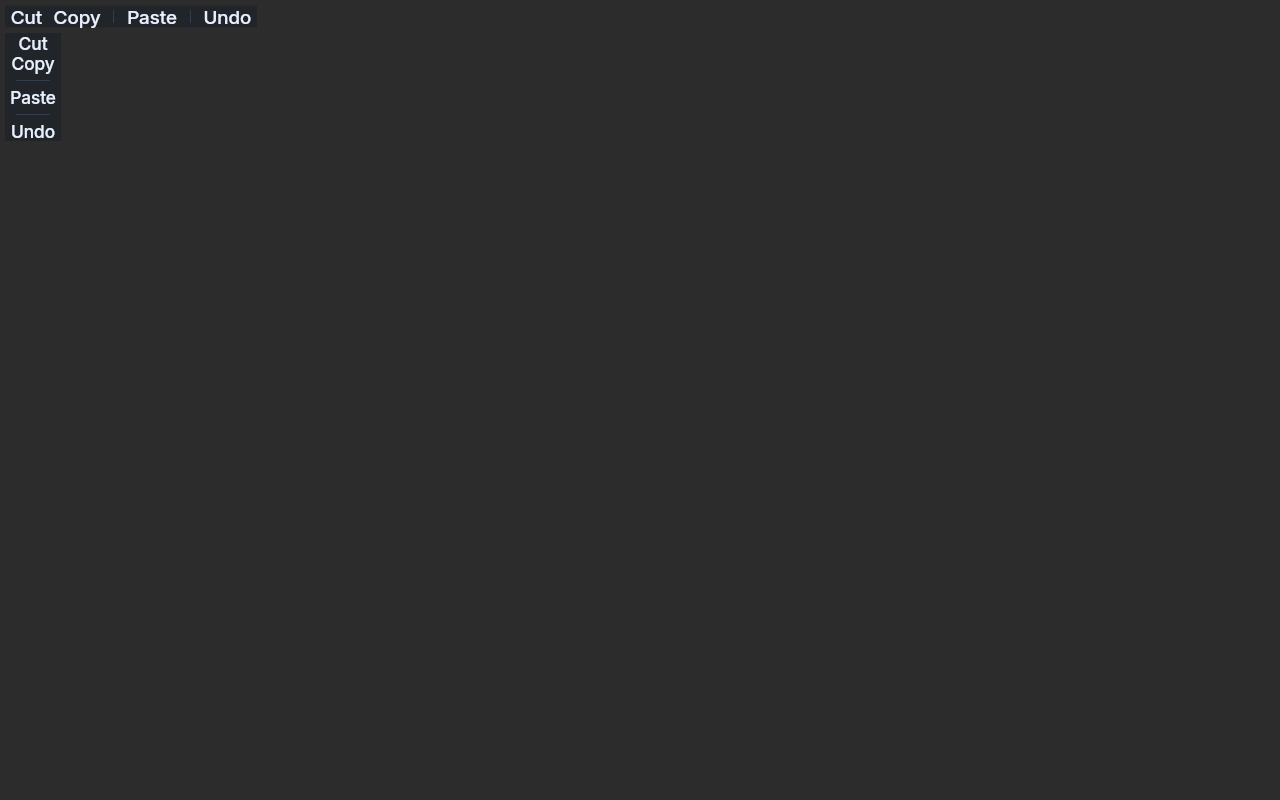
ToolBar  Separator Snippet

A horizontal and a vertical {@code ToolBar} whose item groups are split by {@code SWT.SEPARATOR}

items.

 ./gradlew :examples:runWebExample -PmainClass=dev.equo.ToolBarSeparatorSnippet


What to look at: each separator draws a thin line between its neighbours, as native SWT does. With {@code -Dswt.evolve.bigger_icon_size=true} it is a gap with no line. ??? example "ToolBarSeparatorSnippet.java"

package dev.equo;

import dev.equo.swt.Config;
import org.eclipse.swt.SWT;
import org.eclipse.swt.layout.GridData;
import org.eclipse.swt.layout.GridLayout;
import org.eclipse.swt.widgets.Display;
import org.eclipse.swt.widgets.Shell;
import org.eclipse.swt.widgets.ToolBar;
import org.eclipse.swt.widgets.ToolItem;

/**
 * A horizontal and a vertical {@code ToolBar} whose item groups are split by {@code SWT.SEPARATOR}
 * items.
 *
 * <pre>
 * ./gradlew :examples:runWebExample -PmainClass=dev.equo.ToolBarSeparatorSnippet
 * </pre>
 *
 * <p>What to look at: each separator draws a thin line between its neighbours, as native SWT does.
 * With {@code -Dswt.evolve.bigger_icon_size=true} it is a gap with no line.
 */
public class ToolBarSeparatorSnippet {
    public static void main(String[] args) {
        Config.useEquo(ToolBar.class);
        Config.useEquo(ToolItem.class);
        Display display = new Display();
        Shell shell = new Shell(display);
        shell.setText("ToolBar separators");
        shell.setLayout(new GridLayout(1, false));

        ToolBar horizontal = new ToolBar(shell, SWT.HORIZONTAL | SWT.FLAT);
        fill(horizontal);
        horizontal.setLayoutData(new GridData(SWT.BEGINNING, SWT.CENTER, false, false));

        ToolBar vertical = new ToolBar(shell, SWT.VERTICAL | SWT.FLAT);
        fill(vertical);
        vertical.setLayoutData(new GridData(SWT.BEGINNING, SWT.BEGINNING, false, false));

        shell.setSize(360, 260);
        shell.open();
        while (!shell.isDisposed()) {
            if (!display.readAndDispatch()) display.sleep();
        }
        display.dispose();
    }

    private static void fill(ToolBar bar) {
        item(bar, "Cut");
        item(bar, "Copy");
        new ToolItem(bar, SWT.SEPARATOR);
        item(bar, "Paste");
        new ToolItem(bar, SWT.SEPARATOR);
        item(bar, "Undo");
    }

    private static void item(ToolBar bar, String text) {
        ToolItem item = new ToolItem(bar, SWT.PUSH);
        item.setText(text);
    }
}
[View on GitHub :simple-github:](https://github.com/equodev/swt-evolve/blob/main/examples/src/main/java/dev/equo/ToolBarSeparatorSnippet.java){ .md-button } ### Snippet [![ToolBar Snippet](assets/screenshots/ToolBarSnippet.png)](assets/screenshots/ToolBarSnippet.png){.glightbox} Demonstrates the basic usage of ToolBar widget in SWT. This example creates a simple toolbar with 8 push-style tool items. ??? example "ToolBarSnippet.java"
package dev.equo;

import dev.equo.swt.Config;
import org.eclipse.swt.SWT;
import org.eclipse.swt.graphics.Rectangle;
import org.eclipse.swt.layout.FillLayout;
import org.eclipse.swt.widgets.Display;
import org.eclipse.swt.widgets.Shell;
import org.eclipse.swt.widgets.ToolBar;
import org.eclipse.swt.widgets.ToolItem;

/**
 * Demonstrates the basic usage of ToolBar widget in SWT.
 * This example creates a simple toolbar with 8 push-style tool items.
 */
public class ToolBarSnippet {

public static void main (String [] args) {
    Config.useEquo(ToolBar.class);

    Display display = new Display();
    Shell shell = new Shell (display);
    shell.setLayout (new FillLayout());
    shell.setText("ToolBarSnippet");
    shell.setSize(450, 64);
    ToolBar bar = new ToolBar (shell, SWT.BORDER);
    for (int i=0; i<8; i++) {
        ToolItem item = new ToolItem (bar, SWT.PUSH);
        item.setText ("Item " + i);
    }
    shell.open ();
    while (!shell.isDisposed ()) {
        if (!display.readAndDispatch ()) display.sleep ();
    }
    display.dispose ();
}
}
[View on GitHub :simple-github:](https://github.com/equodev/swt-evolve/blob/main/examples/src/main/java/dev/equo/ToolBarSnippet.java){ .md-button } ### Text Size Snippet [![ToolBar Text Size Snippet](assets/screenshots/ToolBarTextSizeSnippet.png)](assets/screenshots/ToolBarTextSizeSnippet.png){.glightbox} ToolItem text in a roomy ToolBar and in a ToolBar hosted through {@code ToolItem.setControl}, next to a Label: every item's text, PUSH, CHECK and DROP_DOWN, draws at the theme's ToolItem size in both bars, unscaled. ??? example "ToolBarTextSizeSnippet.java"
package dev.equo;

import dev.equo.swt.Config;
import org.eclipse.swt.SWT;
import org.eclipse.swt.layout.FillLayout;
import org.eclipse.swt.layout.GridData;
import org.eclipse.swt.layout.GridLayout;
import org.eclipse.swt.widgets.Composite;
import org.eclipse.swt.widgets.Display;
import org.eclipse.swt.widgets.Label;
import org.eclipse.swt.widgets.Shell;
import org.eclipse.swt.widgets.ToolBar;
import org.eclipse.swt.widgets.ToolItem;

/**
 * ToolItem text in a roomy ToolBar and in a ToolBar hosted through {@code ToolItem.setControl}, next
 * to a Label: every item's text, PUSH, CHECK and DROP_DOWN, draws at the theme's ToolItem size in
 * both bars, unscaled.
 */
public class ToolBarTextSizeSnippet {

    public static void main(String[] args) {
        Config.defaultToEquo();

        Display display = new Display();
        Shell shell = new Shell(display);
        shell.setText("ToolBarTextSizeSnippet");
        shell.setLayout(new GridLayout(2, false));

        new Label(shell, SWT.NONE).setText("Roomy bar:");
        ToolBar roomy = new ToolBar(shell, SWT.FLAT | SWT.RIGHT);
        roomy.setLayoutData(new GridData(SWT.FILL, SWT.CENTER, true, false));
        new ToolItem(roomy, SWT.PUSH).setText("Run");
        new ToolItem(roomy, SWT.PUSH).setText("Tools");
        new ToolItem(roomy, SWT.DROP_DOWN).setText("Debug");

        new Label(shell, SWT.NONE).setText("Hosted bar:");
        ToolBar outer = new ToolBar(shell, SWT.FLAT | SWT.RIGHT);
        ToolItem host = new ToolItem(outer, SWT.SEPARATOR);
        Composite panel = new Composite(outer, SWT.NONE);
        panel.setLayout(new FillLayout());
        ToolBar inner = new ToolBar(panel, SWT.FLAT | SWT.RIGHT);
        new ToolItem(inner, SWT.PUSH).setText("All on");
        new ToolItem(inner, SWT.CHECK).setText("Columns");
        panel.pack();
        host.setWidth(panel.getSize().x);
        host.setControl(panel);

        shell.pack();
        shell.open();
        while (!shell.isDisposed()) {
            if (!display.readAndDispatch()) display.sleep();
        }
        display.dispose();
    }
}
[View on GitHub :simple-github:](https://github.com/equodev/swt-evolve/blob/main/examples/src/main/java/dev/equo/ToolBarTextSizeSnippet.java){ .md-button }