package dev.equo;

import dev.equo.swt.Config;
import org.eclipse.e4.ui.workbench.renderers.swt.TrimmedPartLayout;
import org.eclipse.swt.SWT;
import org.eclipse.swt.graphics.Color;
import org.eclipse.swt.graphics.GC;
import org.eclipse.swt.graphics.Image;
import org.eclipse.swt.layout.GridData;
import org.eclipse.swt.layout.GridLayout;
import org.eclipse.swt.layout.RowLayout;
import org.eclipse.swt.widgets.Composite;
import org.eclipse.swt.widgets.Display;
import org.eclipse.swt.widgets.Label;
import org.eclipse.swt.widgets.Shell;
import org.eclipse.swt.widgets.ToolBar;
import org.eclipse.swt.widgets.ToolItem;

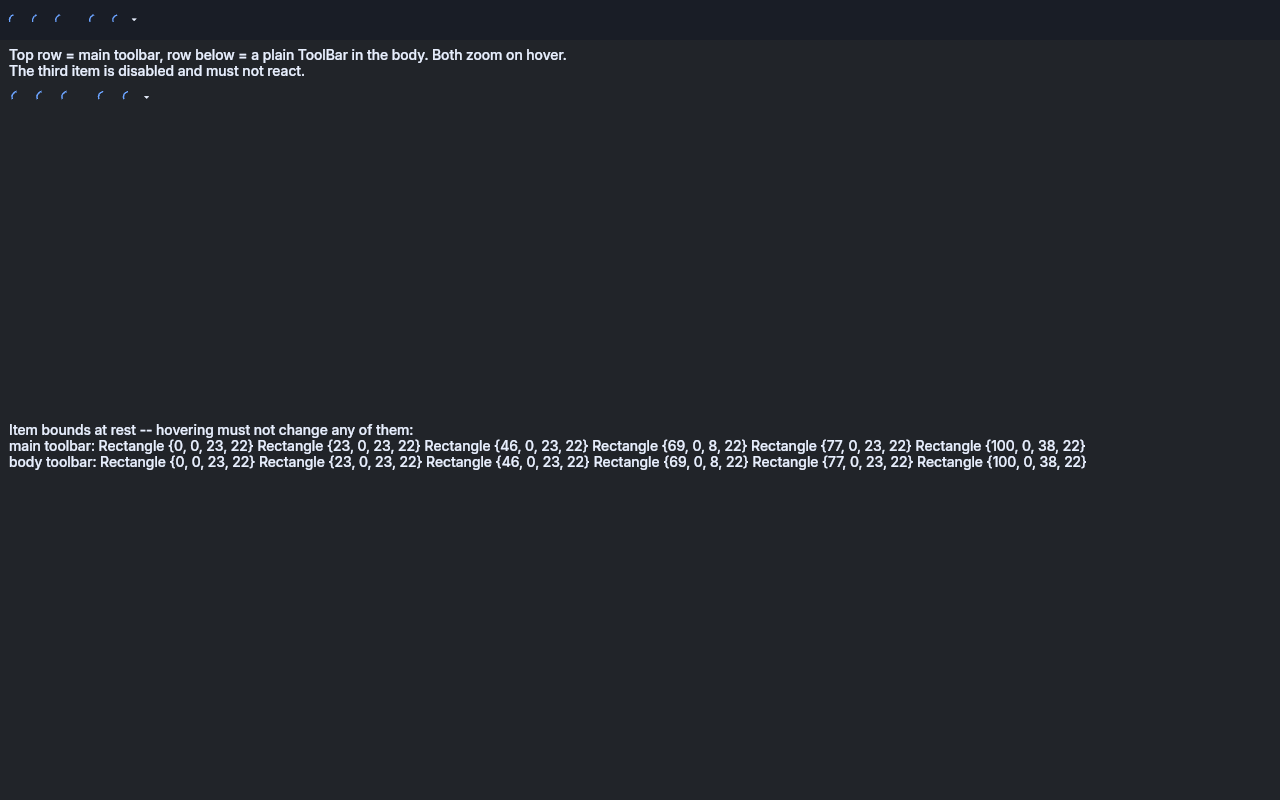
/**
 * Exercises the hovered-icon zoom: a {@code ToolItem} grows its icon while the pointer is over it,
 * and nothing else about the toolbar moves. On by default; {@code disable_hover_zoom}
 * turns it off.
 *
 * <p>Two toolbars carrying the same items are shown — one in the main toolbar (the e4 top trim,
 * which {@link TrimmedPartLayout} stands in for here) and one in the window body. The zoom is not
 * scoped to a particular bar, so both react the same way.
 *
 * <pre>
 * ./gradlew :examples:runDeskExample -PmainClass=dev.equo.ToolItemHoverZoomSnippet
 * ./gradlew :examples:runDeskExample -PmainClass=dev.equo.ToolItemHoverZoomSnippet --args=off
 * </pre>
 *
 * <p>What to look at: the icons under the pointer grow and shrink back in both rows; the disabled
 * item does not react; the toolbar itself never reflows — every item keeps the x it had before the
 * pointer arrived, which the printed geometry confirms. Run it with {@code off} to compare against
 * the native-SWT rendering, which has no hover feedback at all.
 */
public class ToolItemHoverZoomSnippet {

    public static void main(String[] args) {
        applyFlags(args);

        Config.useEquo(ToolBar.class);
        Config.useEquo(ToolItem.class);
        Config.useEquo(Label.class);

        Display display = new Display();
        Shell shell = new Shell(display);
        shell.setText("hover zoom "
                + (Boolean.getBoolean("swt.evolve.disable_hover_zoom") ? "off" : "on"));
        shell.setSize(900, 460);

        TrimmedPartLayout trim = new TrimmedPartLayout();
        shell.setLayout(trim);

        // TOP trim -> DartMainToolbar. It needs a layout of its own, otherwise it hands the whole
        // layout pass back to its superclass.
        Composite mainToolbar = trim.getTrimComposite(shell, SWT.TOP);
        mainToolbar.setLayout(new RowLayout(SWT.HORIZONTAL));
        ToolBar barInTrim = newToolBar(mainToolbar, display);

        Composite body = trim.getClientArea(shell);
        body.setLayout(new GridLayout(1, false));

        Label hint = new Label(body, SWT.WRAP);
        hint.setLayoutData(new GridData(SWT.FILL, SWT.TOP, true, false));
        hint.setText("Top row = main toolbar, row below = a plain ToolBar in the body. "
                + "Both zoom on hover.\nThe third item is disabled and must not react.");

        ToolBar barInBody = newToolBar(body, display);
        barInBody.setLayoutData(new GridData(SWT.FILL, SWT.TOP, true, false));

        Label geometry = new Label(body, SWT.WRAP);
        geometry.setLayoutData(new GridData(SWT.FILL, SWT.FILL, true, true));
        shell.layout(true, true);
        geometry.setText(describe(barInTrim, barInBody));

        shell.open();
        while (!shell.isDisposed()) {
            if (!display.readAndDispatch()) {
                display.sleep();
            }
        }
        display.dispose();
    }

    /** {@code [off]} — set before the first {@code Config} read, which caches the flags. */
    private static void applyFlags(String[] args) {
        boolean off = args.length > 0 && args[0].trim().equalsIgnoreCase("off");
        System.setProperty("swt.evolve.disable_hover_zoom", Boolean.toString(off));
    }

    private static ToolBar newToolBar(Composite parent, Display display) {
        ToolBar bar = new ToolBar(parent, SWT.FLAT | SWT.HORIZONTAL);
        push(bar, display, "New", display.getSystemColor(SWT.COLOR_DARK_BLUE));
        push(bar, display, "Open", display.getSystemColor(SWT.COLOR_DARK_GREEN));

        ToolItem disabled = push(bar, display, "Save (disabled)", display.getSystemColor(SWT.COLOR_DARK_RED));
        disabled.setEnabled(false);

        new ToolItem(bar, SWT.SEPARATOR);

        ToolItem check = new ToolItem(bar, SWT.CHECK);
        check.setToolTipText("Toggle");
        check.setImage(square(display, display.getSystemColor(SWT.COLOR_DARK_MAGENTA)));

        ToolItem dropDown = new ToolItem(bar, SWT.DROP_DOWN);
        dropDown.setToolTipText("More");
        dropDown.setImage(square(display, display.getSystemColor(SWT.COLOR_DARK_CYAN)));
        return bar;
    }

    private static ToolItem push(ToolBar bar, Display display, String tooltip, Color color) {
        ToolItem item = new ToolItem(bar, SWT.PUSH);
        item.setToolTipText(tooltip);
        item.setImage(square(display, color));
        return item;
    }

    /** A flat 16x16 tile, so the zoom is judged on size alone and not on any artwork detail. */
    private static Image square(Display display, Color color) {
        Image image = new Image(display, 16, 16);
        GC gc = new GC(image);
        gc.setBackground(color);
        gc.fillRectangle(0, 0, 16, 16);
        gc.dispose();
        return image;
    }

    private static String describe(ToolBar inTrim, ToolBar inBody) {
        StringBuilder out = new StringBuilder("Item bounds at rest -- hovering must not change any of them:\n");
        appendBounds(out, "main toolbar", inTrim);
        appendBounds(out, "body toolbar", inBody);
        System.out.println(out);
        return out.toString();
    }

    private static void appendBounds(StringBuilder out, String what, ToolBar bar) {
        out.append(what).append(": ");
        for (ToolItem item : bar.getItems()) {
            out.append(item.getBounds()).append(' ');
        }
        out.append('\n');
    }
}