Skip to content

Table Examples

Instances of this class implement a selectable user interface object that displays a list of images and strings and issues notification when selected.

Cell Editor Selection Snippet
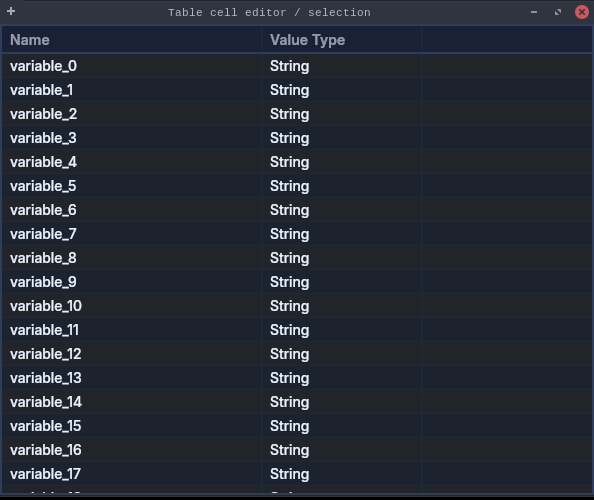
Table  Cell Editor Selection Snippet

Example demonstrating TableCellEditorSelectionSnippet.

TableCellEditorSelectionSnippet.java
package dev.equo.jface;

import java.util.EventObject;

import org.eclipse.jface.viewers.ArrayContentProvider;
import org.eclipse.jface.viewers.CellEditor;
import org.eclipse.jface.viewers.ColumnLabelProvider;
import org.eclipse.jface.viewers.ColumnViewer;
import org.eclipse.jface.viewers.ColumnViewerEditor;
import org.eclipse.jface.viewers.ColumnViewerEditorActivationEvent;
import org.eclipse.jface.viewers.ColumnViewerEditorActivationStrategy;
import org.eclipse.jface.viewers.EditingSupport;
import org.eclipse.jface.viewers.FocusCellOwnerDrawHighlighter;
import org.eclipse.jface.viewers.TableViewer;
import org.eclipse.jface.viewers.TableViewerColumn;
import org.eclipse.jface.viewers.TableViewerEditor;
import org.eclipse.jface.viewers.TableViewerFocusCellManager;
import org.eclipse.jface.viewers.TextCellEditor;
import org.eclipse.jface.viewers.ViewerCell;
import org.eclipse.swt.SWT;
import org.eclipse.swt.events.MouseEvent;
import org.eclipse.swt.layout.FillLayout;
import org.eclipse.swt.widgets.Composite;
import org.eclipse.swt.widgets.Display;
import org.eclipse.swt.widgets.Shell;

public class TableCellEditorSelectionSnippet {

    private static final int ACTIVATION_BIT_MASK = ColumnViewerEditor.TABBING_HORIZONTAL
            | ColumnViewerEditor.TABBING_MOVE_TO_ROW_NEIGHBOR | ColumnViewerEditor.KEYBOARD_ACTIVATION;

    public static void main(String[] args) {
        Display display = new Display();
        Shell shell = new Shell(display);
        shell.setText("Table cell editor / selection");
        shell.setLayout(new FillLayout());
        shell.setSize(600, 500);

        final TableViewer tableViewer = new TableViewer(shell, SWT.BORDER | SWT.FULL_SELECTION | SWT.MULTI);
        tableViewer.getTable().setHeaderVisible(true);
        tableViewer.getTable().setLinesVisible(true);

        TableViewerColumn nameCol = new TableViewerColumn(tableViewer, SWT.NONE);
        nameCol.getColumn().setText("Name");
        nameCol.getColumn().setWidth(260);
        nameCol.setLabelProvider(new ColumnLabelProvider() {
            @Override
            public String getText(Object element) {
                return String.valueOf(element);
            }
        });
        nameCol.setEditingSupport(new EditingSupport(tableViewer) {
            @Override
            protected CellEditor getCellEditor(Object element) {
                return new TextCellEditor(tableViewer.getTable());
            }

            @Override
            protected boolean canEdit(Object element) {
                return true;
            }

            @Override
            protected Object getValue(Object element) {
                return String.valueOf(element);
            }

            @Override
            protected void setValue(Object element, Object value) {
            }
        });

        TableViewerColumn typeCol = new TableViewerColumn(tableViewer, SWT.NONE);
        typeCol.getColumn().setText("Value Type");
        typeCol.getColumn().setWidth(160);
        typeCol.setLabelProvider(new ColumnLabelProvider() {
            @Override
            public String getText(Object element) {
                return "String";
            }
        });

        final TableViewerFocusCellManager focusCellManager = new TableViewerFocusCellManager(tableViewer,
                new FocusCellOwnerDrawHighlighter(tableViewer));

        ColumnViewerEditorActivationStrategy activationStrategy = new ColumnViewerEditorActivationStrategy(tableViewer) {
            @Override
            protected boolean isEditorActivationEvent(ColumnViewerEditorActivationEvent event) {
                switch (event.eventType) {
                    case ColumnViewerEditorActivationEvent.MOUSE_CLICK_SELECTION:
                        Object src = event.getSource();
                        return src instanceof ViewerCell && src.equals(focusCellManager.getFocusCell())
                                && isLeftClick(event.sourceEvent);
                    case ColumnViewerEditorActivationEvent.MOUSE_DOUBLE_CLICK_SELECTION:
                        return isLeftClick(event.sourceEvent);
                    case ColumnViewerEditorActivationEvent.KEY_PRESSED:
                        return event.keyCode == SWT.CR;
                    case ColumnViewerEditorActivationEvent.PROGRAMMATIC:
                        return true;
                }
                return false;
            }

            private boolean isLeftClick(EventObject e) {
                return e instanceof MouseEvent && ((MouseEvent) e).button == 1;
            }
        };

        TableViewerEditor.create(tableViewer, focusCellManager, activationStrategy, ACTIVATION_BIT_MASK);

        String[] rows = new String[40];
        for (int i = 0; i < rows.length; i++) {
            rows[i] = "variable_" + i;
        }
        tableViewer.setContentProvider(ArrayContentProvider.getInstance());
        tableViewer.setInput(rows);

        shell.open();
        while (!shell.isDisposed()) {
            if (!display.readAndDispatch()) {
                display.sleep();
            }
        }
        display.dispose();
    }
}

View on GitHub

Cell Hover Zoom Snippet

Table  Cell Hover Zoom Snippet

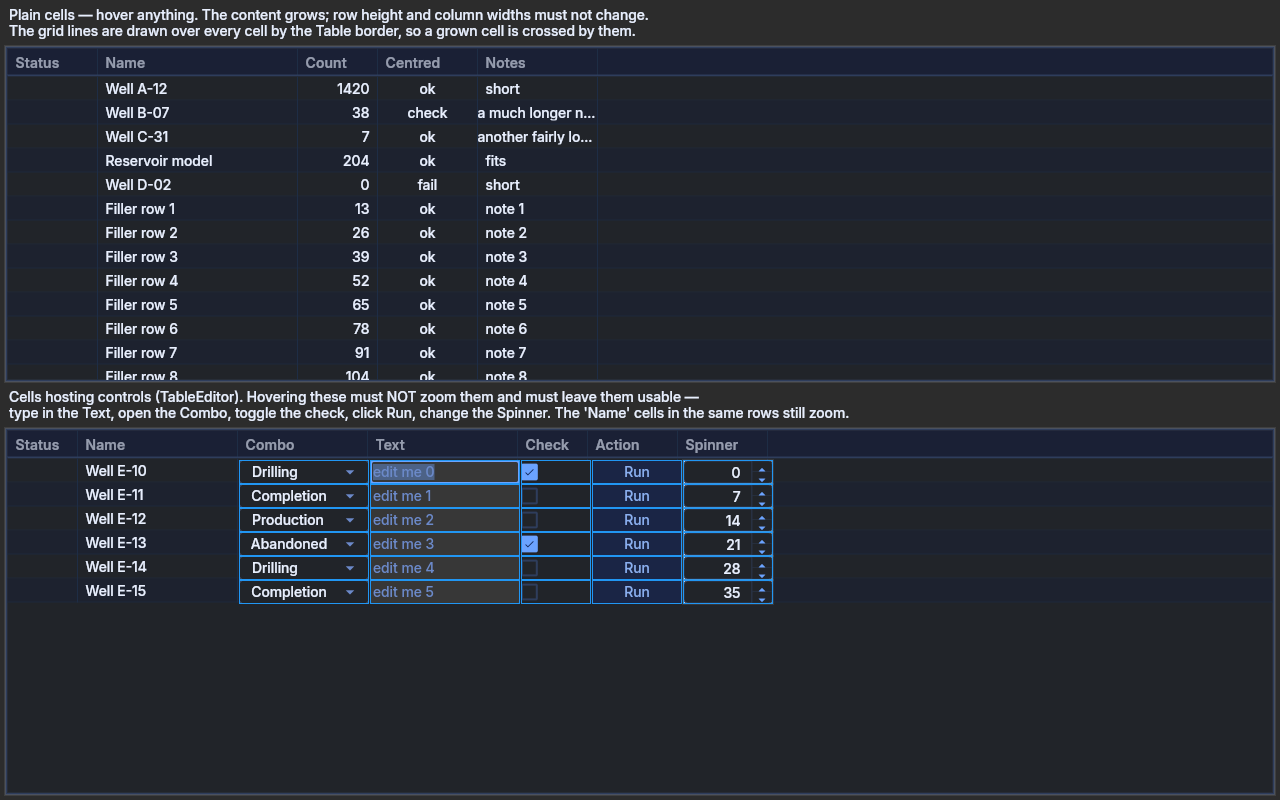
Spike: the hovered-ToolItem zoom, applied to Table cells. The content of the cell under the

pointer grows; the row keeps the height the size model laid the table out from.

 ./gradlew :examples:runDeskExample -PmainClass=dev.equo.TableCellHoverZoomSnippet


Two tables, because they answer different questions.

Top — plain cells. Text, images, alignments. What to judge:

  • Does growing one cell read as feedback, or as the table wobbling? A toolbar icon is an island with space around it; a cell has a neighbour one pixel away in all four directions.
  • The grid lines are painted by the Table's own border, which Flutter draws after every cell — so a grown cell is crossed by the column divider and cannot cover it.
  • "Notes" is narrow on purpose: its text is already ellipsized, so zooming scales the ellipsis rather than revealing more text.
  • Right- and centre-aligned columns anchor the growth at their own edge.

Bottom — cells hosting real controls through {@link TableEditor}: Combo, Text, a CHECK Button, a PUSH Button and a Spinner. These are not painted by the cell at all — the editor puts a live control on top of it — so the zoom should not reach them. That is the thing to confirm: hovering a hosted control must leave it alone and keep it usable (type in the Text, open the Combo, click the buttons), while the plain cells in the same row still zoom. ??? example "TableCellHoverZoomSnippet.java"

package dev.equo;

import dev.equo.swt.Config;
import org.eclipse.swt.SWT;
import org.eclipse.swt.custom.TableEditor;
import org.eclipse.swt.graphics.Color;
import org.eclipse.swt.graphics.GC;
import org.eclipse.swt.graphics.Image;
import org.eclipse.swt.layout.GridData;
import org.eclipse.swt.layout.GridLayout;
import org.eclipse.swt.widgets.Button;
import org.eclipse.swt.widgets.Combo;
import org.eclipse.swt.widgets.Display;
import org.eclipse.swt.widgets.Label;
import org.eclipse.swt.widgets.Shell;
import org.eclipse.swt.widgets.Spinner;
import org.eclipse.swt.widgets.Table;
import org.eclipse.swt.widgets.TableColumn;
import org.eclipse.swt.widgets.TableItem;
import org.eclipse.swt.widgets.Text;

/**
 * Spike: the hovered-ToolItem zoom, applied to Table cells. The content of the cell under the
 * pointer grows; the row keeps the height the size model laid the table out from.
 *
 * <pre>
 * ./gradlew :examples:runDeskExample -PmainClass=dev.equo.TableCellHoverZoomSnippet
 * </pre>
 *
 * <p>Two tables, because they answer different questions.
 *
 * <p><b>Top — plain cells.</b> Text, images, alignments. What to judge:
 * <ul>
 * <li>Does growing one cell read as feedback, or as the table wobbling? A toolbar icon is an island
 *     with space around it; a cell has a neighbour one pixel away in all four directions.</li>
 * <li>The grid lines are painted by the Table's own border, which Flutter draws <em>after</em> every
 *     cell — so a grown cell is crossed by the column divider and cannot cover it.</li>
 * <li>"Notes" is narrow on purpose: its text is already ellipsized, so zooming scales the ellipsis
 *     rather than revealing more text.</li>
 * <li>Right- and centre-aligned columns anchor the growth at their own edge.</li>
 * </ul>
 *
 * <p><b>Bottom — cells hosting real controls</b> through {@link TableEditor}: Combo, Text, a CHECK
 * Button, a PUSH Button and a Spinner. These are not painted by the cell at all — the editor puts a
 * live control on top of it — so the zoom should <em>not</em> reach them. That is the thing to
 * confirm: hovering a hosted control must leave it alone and keep it usable (type in the Text, open
 * the Combo, click the buttons), while the plain cells in the same row still zoom.
 */
public class TableCellHoverZoomSnippet {

    public static void main(String[] args) {
        Config.useEquo(Table.class);
        Config.useEquo(TableItem.class);
        Config.useEquo(TableColumn.class);
        Config.useEquo(Label.class);
        Config.useEquo(Combo.class);
        Config.useEquo(Button.class);
        Config.useEquo(Text.class);

        Display display = new Display();
        Shell shell = new Shell(display);
        shell.setText("Table cell hover zoom");
        shell.setSize(860, 620);
        shell.setLayout(new GridLayout(1, false));

        Image green = square(display, display.getSystemColor(SWT.COLOR_DARK_GREEN));
        Image red = square(display, display.getSystemColor(SWT.COLOR_DARK_RED));

        label(shell, "Plain cells — hover anything. The content grows; row height and column "
                + "widths must not change.\nThe grid lines are drawn over every cell by the Table "
                + "border, so a grown cell is crossed by them.");
        buildPlainTable(shell, green, red);

        label(shell, "Cells hosting controls (TableEditor). Hovering these must NOT zoom them and "
                + "must leave them usable —\ntype in the Text, open the Combo, toggle the check, "
                + "click Run, change the Spinner. The 'Name' cells in the same rows still zoom.");
        buildEditorTable(shell, green, red);

        shell.open();
        while (!shell.isDisposed()) {
            if (!display.readAndDispatch()) {
                display.sleep();
            }
        }
        display.dispose();
    }

    private static void buildPlainTable(Shell shell, Image green, Image red) {
        Table table = new Table(shell, SWT.BORDER | SWT.FULL_SELECTION);
        table.setHeaderVisible(true);
        table.setLinesVisible(true);
        GridData data = new GridData(SWT.FILL, SWT.FILL, true, true);
        data.heightHint = 190;
        table.setLayoutData(data);

        newColumn(table, "Status", 90, SWT.LEFT);
        newColumn(table, "Name", 200, SWT.LEFT);
        newColumn(table, "Count", 80, SWT.RIGHT);
        newColumn(table, "Centred", 100, SWT.CENTER);
        newColumn(table, "Notes", 120, SWT.LEFT);

        row(table, green, "Well A-12", "1420", "ok", "short");
        row(table, red, "Well B-07", "38", "check", "a much longer note that will be ellipsized");
        row(table, green, "Well C-31", "7", "ok", "another fairly long note here");
        row(table, green, "Reservoir model", "204", "ok", "fits");
        row(table, red, "Well D-02", "0", "fail", "short");
        for (int i = 1; i <= 8; i++) {
            row(table, i % 2 == 0 ? green : red, "Filler row " + i, String.valueOf(i * 13), "ok",
                    "note " + i);
        }
    }

    /**
     * Every cell kind an application actually puts in a table: a read-only Combo, an editable Text,
     * a CHECK Button, a PUSH Button and a Spinner, each hosted by its own {@link TableEditor}.
     */
    private static void buildEditorTable(Shell shell, Image green, Image red) {
        Table table = new Table(shell, SWT.BORDER | SWT.FULL_SELECTION);
        table.setHeaderVisible(true);
        table.setLinesVisible(true);
        GridData data = new GridData(SWT.FILL, SWT.FILL, true, true);
        data.heightHint = 220;
        table.setLayoutData(data);

        newColumn(table, "Status", 70, SWT.LEFT);
        newColumn(table, "Name", 160, SWT.LEFT);
        newColumn(table, "Combo", 130, SWT.LEFT);
        newColumn(table, "Text", 150, SWT.LEFT);
        newColumn(table, "Check", 70, SWT.CENTER);
        newColumn(table, "Action", 90, SWT.LEFT);
        newColumn(table, "Spinner", 90, SWT.LEFT);

        String[] phases = {"Drilling", "Completion", "Production", "Abandoned"};

        for (int i = 0; i < 6; i++) {
            TableItem item = new TableItem(table, SWT.NONE);
            item.setImage(0, i % 2 == 0 ? green : red);
            // Columns 2..6 are covered by an editor, so they carry no text of their own.
            item.setText(new String[] {"", "Well E-" + (10 + i), "", "", "", "", ""});

            Combo combo = new Combo(table, SWT.READ_ONLY);
            combo.setItems(phases);
            combo.select(i % phases.length);
            editor(table).setEditor(combo, item, 2);

            Text text = new Text(table, SWT.BORDER);
            text.setText("edit me " + i);
            editor(table).setEditor(text, item, 3);

            Button check = new Button(table, SWT.CHECK);
            check.setSelection(i % 3 == 0);
            editor(table).setEditor(check, item, 4);

            Button run = new Button(table, SWT.PUSH);
            run.setText("Run");
            editor(table).setEditor(run, item, 5);

            Spinner spinner = new Spinner(table, SWT.BORDER);
            spinner.setMinimum(0);
            spinner.setMaximum(100);
            spinner.setSelection(i * 7);
            editor(table).setEditor(spinner, item, 6);
        }
    }

    /** A TableEditor that fills its cell, which is what every hosted control here wants. */
    private static TableEditor editor(Table table) {
        TableEditor editor = new TableEditor(table);
        editor.grabHorizontal = true;
        editor.grabVertical = true;
        return editor;
    }

    private static void label(Shell shell, String text) {
        Label label = new Label(shell, SWT.WRAP);
        label.setLayoutData(new GridData(SWT.FILL, SWT.TOP, true, false));
        label.setText(text);
    }

    private static void newColumn(Table table, String text, int width, int alignment) {
        TableColumn column = new TableColumn(table, alignment);
        column.setText(text);
        column.setWidth(width);
    }

    private static void row(Table table, Image image, String name, String count, String centred,
                            String note) {
        TableItem item = new TableItem(table, SWT.NONE);
        item.setImage(0, image);
        item.setText(new String[] {"", name, count, centred, note});
    }

    /** A flat 12x12 tile, so the zoom is judged on size alone and not on any artwork detail. */
    private static Image square(Display display, Color color) {
        Image image = new Image(display, 12, 12);
        GC gc = new GC(image);
        gc.setBackground(color);
        gc.fillRectangle(0, 0, 12, 12);
        gc.dispose();
        return image;
    }
}
[View on GitHub :simple-github:](https://github.com/equodev/swt-evolve/blob/main/examples/src/main/java/dev/equo/TableCellHoverZoomSnippet.java){ .md-button } ### Drag Drop Snippet [![Table Drag Drop Snippet](assets/screenshots/TableDragDropSnippet.png)](assets/screenshots/TableDragDropSnippet.png){.glightbox} Exercises dragging a row within a Table to reorder it, using the same TableViewer#addDragSupport / #addDropSupport idiom (DND.DROP_MOVE + TextTransfer, index-as-string payload). ??? example "TableDragDropSnippet.java"
package dev.equo;

import dev.equo.swt.Config;
import org.eclipse.swt.SWT;
import org.eclipse.swt.dnd.DND;
import org.eclipse.swt.dnd.DragSource;
import org.eclipse.swt.dnd.DragSourceAdapter;
import org.eclipse.swt.dnd.DragSourceEvent;
import org.eclipse.swt.dnd.DropTarget;
import org.eclipse.swt.dnd.DropTargetAdapter;
import org.eclipse.swt.dnd.DropTargetEvent;
import org.eclipse.swt.dnd.TextTransfer;
import org.eclipse.swt.dnd.Transfer;
import org.eclipse.swt.layout.FillLayout;
import org.eclipse.swt.widgets.Display;
import org.eclipse.swt.widgets.Label;
import org.eclipse.swt.widgets.Shell;
import org.eclipse.swt.widgets.Table;
import org.eclipse.swt.widgets.TableItem;

import java.util.ArrayList;
import java.util.List;

/**
 * Exercises dragging a row within a Table to reorder it, using the same
 * TableViewer#addDragSupport / #addDropSupport idiom
 * (DND.DROP_MOVE + TextTransfer, index-as-string payload).
 */
public class TableDragDropSnippet {

    public static void main(String[] args) {
        Config.useEquo(Table.class);

        Display display = new Display();
        Shell shell = new Shell(display);
        shell.setLayout(new FillLayout(SWT.VERTICAL));
        shell.setText("TableDragDropSnippet");
        shell.setSize(300, 300);

        Label hint = new Label(shell, SWT.NONE);
        hint.setText("Drag a row and drop it on another row to reorder.");

        Table table = new Table(shell, SWT.BORDER | SWT.FULL_SELECTION);

        List<String> order = new ArrayList<>(List.of(
                "id", "name", "css selector", "xpath", "link text"));

        for (String s : order) {
            TableItem item = new TableItem(table, SWT.NONE);
            item.setText(s);
        }

        DragSource dragSource = new DragSource(table, DND.DROP_MOVE);
        dragSource.setTransfer(new Transfer[]{TextTransfer.getInstance()});
        dragSource.addDragListener(new DragSourceAdapter() {
            @Override
            public void dragSetData(DragSourceEvent event) {
                int index = table.getSelectionIndex();
                event.data = String.valueOf(index);
            }
        });

        DropTarget dropTarget = new DropTarget(table, DND.DROP_MOVE);
        dropTarget.setTransfer(new Transfer[]{TextTransfer.getInstance()});
        dropTarget.addDropListener(new DropTargetAdapter() {
            @Override
            public void drop(DropTargetEvent event) {
                if (event.data == null) return;
                // event.item == null means the drop landed past the last row (there is no
                // TableItem there to resolve) rather than an invalid drop — treat it as
                // "append at the end", the same convention Snippet91 uses for Tree.
                TableItem targetItem = (TableItem) event.item;
                int newIndex = targetItem != null ? table.indexOf(targetItem) : order.size();
                int oldIndex = Integer.parseInt((String) event.data);
                if (oldIndex == newIndex) return;

                String moved = order.remove(oldIndex);
                // Removing the source before inserting shifts every later index down by one,
                // so a downward drag (oldIndex < newIndex) must target newIndex - 1 to land the
                // moved row on the drop target's own position rather than one row past it.
                if (oldIndex < newIndex) {
                    newIndex--;
                }
                order.add(newIndex, moved);

                table.removeAll();
                for (String s : order) {
                    TableItem item = new TableItem(table, SWT.NONE);
                    item.setText(s);
                }
                table.setSelection(newIndex);
            }
        });

        shell.open();
        while (!shell.isDisposed()) {
            if (!display.readAndDispatch()) {
                display.sleep();
            }
        }
        display.dispose();
    }
}
[View on GitHub :simple-github:](https://github.com/equodev/swt-evolve/blob/main/examples/src/main/java/dev/equo/TableDragDropSnippet.java){ .md-button } ### Multiple Editors [![Table Multiple Editors](assets/screenshots/TableMultipleEditors.png)](assets/screenshots/TableMultipleEditors.png){.glightbox} Example demonstrating TableMultipleEditors. ??? example "TableMultipleEditors.java"
package dev.equo;

import org.eclipse.swt.SWT;
import org.eclipse.swt.custom.TableEditor;
import org.eclipse.swt.layout.FillLayout;
import org.eclipse.swt.widgets.*;

public class TableMultipleEditors {

    public static void main(String[] args) {
        Display display = new Display();
        Shell shell = new Shell(display);
        shell.setText("Table with multiple editors");
        shell.setLayout(new FillLayout());

        Table table = new Table(shell, SWT.BORDER | SWT.FULL_SELECTION);
        table.setHeaderVisible(true);
        table.setLinesVisible(true);

        String[] titles = { "ID", "Name", "Type", "Active" };
        int[] widths = { 80, 150, 120, 80 };

        for (int i = 0; i < titles.length; i++) {
            TableColumn col = new TableColumn(table, SWT.NONE);
            col.setText(titles[i]);
            col.setWidth(widths[i]);
        }

        for (int i = 1; i <= 5; i++) {
            TableItem item = new TableItem(table, SWT.NONE);
            item.setText(new String[] {
                    String.valueOf(i),
                    "Item " + i,
                    "A",
                    i % 2 == 0 ? "Yes" : "No" // TODO
            });
        }

        for (TableItem item : table.getItems()) {

            TableEditor textEditor = new TableEditor(table);
            Text text = new Text(table, SWT.NONE);
            text.setText(item.getText(1));
            text.addModifyListener(e ->
                    item.setText(1, text.getText())
            );
            textEditor.grabHorizontal = true;
            textEditor.setEditor(text, item, 1);

            TableEditor comboEditor = new TableEditor(table);
            Combo combo = new Combo(table, SWT.READ_ONLY);
            combo.setItems(new String[] { "A", "B", "C" });
            combo.setText(item.getText(2));
            combo.addListener(SWT.Selection, e ->
                    item.setText(2, combo.getText())
            );
            comboEditor.grabHorizontal = true;
            comboEditor.setEditor(combo, item, 2);

            TableEditor checkEditor = new TableEditor(table);
            Button check = new Button(table, SWT.CHECK);
            check.setSelection("Yes".equals(item.getText(3)));
            check.addListener(SWT.Selection, e ->
                    item.setText(3, check.getSelection() ? "Yes" : "No")
            );
            checkEditor.horizontalAlignment = SWT.CENTER;
            checkEditor.setEditor(check, item, 3);
        }

        shell.setSize(500, 300);
        shell.open();

        while (!shell.isDisposed()) {
            if (!display.readAndDispatch()) {
                display.sleep();
            }
        }
        display.dispose();
    }
}
[View on GitHub :simple-github:](https://github.com/equodev/swt-evolve/blob/main/examples/src/main/java/dev/equo/TableMultipleEditors.java){ .md-button } ### No Columns Snippet [![Table No Columns Snippet](assets/screenshots/TableNoColumnsSnippet.png)](assets/screenshots/TableNoColumnsSnippet.png){.glightbox} Example demonstrating TableNoColumnsSnippet. ??? example "TableNoColumnsSnippet.java"
package dev.equo;

import dev.equo.swt.Config;
import org.eclipse.swt.SWT;
import org.eclipse.swt.layout.GridData;
import org.eclipse.swt.layout.GridLayout;
import org.eclipse.swt.widgets.Display;
import org.eclipse.swt.widgets.Label;
import org.eclipse.swt.widgets.Shell;
import org.eclipse.swt.widgets.Table;
import org.eclipse.swt.widgets.TableColumn;
import org.eclipse.swt.widgets.TableItem;

public class TableNoColumnsSnippet {

    public static void main(String[] args) {
        Config.useEquo(Table.class);
        Config.useEquo(TableItem.class);
        Config.useEquo(TableColumn.class);

        Display display = new Display();
        Shell shell = new Shell(display);
        shell.setText("TableNoColumnsSnippet");
        shell.setLayout(new GridLayout(1, false));

        new Label(shell, SWT.NONE).setText("Ranges:");

        Table ranges = new Table(shell, SWT.BORDER | SWT.V_SCROLL);
        ranges.setLayoutData(new GridData(SWT.BEGINNING, SWT.BEGINNING, false, false));
        for (String range : new String[] {
                "Current range", "Range linked to current", "Editable range", "Final caret location" }) {
            new TableItem(ranges, SWT.NONE).setText(range);
        }

        new Label(shell, SWT.NONE).setText("Annotation types:");

        Table annotations = new Table(shell, SWT.BORDER | SWT.V_SCROLL);
        annotations.setLayoutData(new GridData(SWT.BEGINNING, SWT.BEGINNING, false, false));
        for (String annotation : new String[] {
                "Bookmarks", "Breakpoints", "Cucumber unmatched step", "Debug Call Stack", "Errors",
                "Spelling Errors" }) {
            new TableItem(annotations, SWT.NONE).setText(annotation);
        }

        shell.pack();
        shell.open();
        while (!shell.isDisposed()) {
            if (!display.readAndDispatch()) display.sleep();
        }
        display.dispose();
    }
}
[View on GitHub :simple-github:](https://github.com/equodev/swt-evolve/blob/main/examples/src/main/java/dev/equo/TableNoColumnsSnippet.java){ .md-button } ### Paint Item Snippet [![Table Paint Item Snippet](assets/screenshots/TablePaintItemSnippet.png)](assets/screenshots/TablePaintItemSnippet.png){.glightbox} Replicates two real-world SWT.PaintItem patterns on the same Table, both driven by TableHelper.firePaintItemForEmptyCells (the cells have no item.image of their own):
  • "Value" column: drawText + textExtent + drawImage.
  • "Selected" column: only drawImage, toggled on click.
??? example "TablePaintItemSnippet.java"
package dev.equo;

import dev.equo.swt.Config;
import org.eclipse.swt.SWT;
import org.eclipse.swt.graphics.Color;
import org.eclipse.swt.graphics.GC;
import org.eclipse.swt.graphics.Image;
import org.eclipse.swt.graphics.Point;
import org.eclipse.swt.graphics.RGB;
import org.eclipse.swt.graphics.Rectangle;
import org.eclipse.swt.layout.FillLayout;
import org.eclipse.swt.widgets.Display;
import org.eclipse.swt.widgets.Shell;
import org.eclipse.swt.widgets.Table;
import org.eclipse.swt.widgets.TableColumn;
import org.eclipse.swt.widgets.TableItem;

/**
 * Replicates two real-world SWT.PaintItem patterns on the same Table, both driven by
 * TableHelper.firePaintItemForEmptyCells (the cells have no item.image of their own):
 * <ul>
 *   <li>"Value" column: drawText +
 *   textExtent + drawImage.</li>
 *   <li>"Selected" column: only drawImage,
 *   toggled on click.</li>
 * </ul>
 */
public class TablePaintItemSnippet {

    public static void main(String[] args) {
        Config.useEquo(Table.class);
        Config.useEquo(TableItem.class);
        Config.useEquo(TableColumn.class);

        Display display = new Display();
        Shell shell = new Shell(display);
        shell.setLayout(new FillLayout());
        shell.setText("Table PaintItem - Profile + Checkbox");
        shell.setSize(450, 300);

        Image valueIcon = solidImage(display, 12, 12, new RGB(0, 100, 200));
        Image checkedImage = solidImage(display, 16, 16, new RGB(0, 150, 0));
        Image uncheckedImage = solidImage(display, 16, 16, new RGB(200, 200, 200));

        Table table = new Table(shell, SWT.BORDER | SWT.FULL_SELECTION);
        table.setHeaderVisible(true);
        table.setLinesVisible(true);

        TableColumn valueColumn = new TableColumn(table, SWT.NONE);
        valueColumn.setText("Value");
        valueColumn.setWidth(280);

        TableColumn selectedColumn = new TableColumn(table, SWT.NONE);
        selectedColumn.setText("Selected");
        selectedColumn.setWidth(100);

        int rowCount = 6;
        boolean[] selected = new boolean[rowCount];
        for (int i = 0; i < rowCount; i++) {
            TableItem item = new TableItem(table, SWT.NONE);
            item.setText(0, "Profile value " + i);
            // Column 1 left empty on purpose: getImages() returns null for it,
            // so firePaintItemForEmptyCells fires SWT.PaintItem for that cell.
        }

        table.addListener(SWT.PaintItem, event -> {
            TableItem item = (TableItem) event.item;
            int rowIndex = table.indexOf(item);
            if (event.index == 0) {
                String text = item.getText(0);
                int textX = event.x + 2;
                event.gc.drawText(text, textX, event.y + 2, true);
                int textWidth = event.gc.textExtent(text).x;
                int imageX = textX + textWidth + 5;
                int imageY = event.y + (event.height - valueIcon.getBounds().height) / 2;
                event.gc.drawImage(valueIcon, imageX, imageY);
            } else if (event.index == 1) {
                Image icon = selected[rowIndex] ? checkedImage : uncheckedImage;
                int imageY = event.y + (event.height - icon.getBounds().height) / 2;
                event.gc.drawImage(icon, event.x + 5, imageY);
            }
        });

        table.addListener(SWT.MouseDown, event -> {
            TableItem item = table.getItem(new Point(event.x, event.y));
            if (item == null) return;
            Rectangle cellBounds = item.getBounds(1);
            if (cellBounds.contains(event.x, event.y)) {
                int rowIndex = table.indexOf(item);
                selected[rowIndex] = !selected[rowIndex];
                // Re-sets the same text to mark the item dirty, forcing a re-render
                // so getImages() recomputes the "Selected" cell with the new state.
                item.setText(0, item.getText(0));
            }
        });

        shell.open();
        while (!shell.isDisposed()) {
            if (!display.readAndDispatch()) {
                display.sleep();
            }
        }
        valueIcon.dispose();
        checkedImage.dispose();
        uncheckedImage.dispose();
        display.dispose();
    }

    private static Image solidImage(Display display, int width, int height, RGB rgb) {
        Image image = new Image(display, width, height);
        GC gc = new GC(image);
        Color color = new Color(display, rgb);
        gc.setBackground(color);
        gc.fillRectangle(0, 0, width, height);
        gc.dispose();
        color.dispose();
        return image;
    }
}
[View on GitHub :simple-github:](https://github.com/equodev/swt-evolve/blob/main/examples/src/main/java/dev/equo/TablePaintItemSnippet.java){ .md-button } ### Snippet [![Table Snippet](assets/screenshots/TableSnippet.png)](assets/screenshots/TableSnippet.png){.glightbox} Example demonstrating TableSnippet. ??? example "TableSnippet.java"
package dev.equo;

import dev.equo.swt.Config;
import org.eclipse.swt.SWT;
import org.eclipse.swt.layout.FillLayout;
import org.eclipse.swt.widgets.Display;
import org.eclipse.swt.widgets.Shell;
import org.eclipse.swt.widgets.Table;
import org.eclipse.swt.widgets.TableColumn;
import org.eclipse.swt.widgets.TableItem;

public class TableSnippet {

    public static void main(String[] args) {
        Config.useEquo(Table.class);
        Config.useEquo(TableItem.class);
        Config.useEquo(TableColumn.class);

        Display display = new Display();
        Shell shell = new Shell(display);
        shell.setLayout(new FillLayout());
        shell.setText("TableSnippet");
        shell.setSize(400, 250);

        Table table = new Table(shell, SWT.BORDER | SWT.FULL_SELECTION);
        table.setHeaderVisible(true);
        table.setLinesVisible(true);

        TableColumn nameColumn = new TableColumn(table, SWT.NONE);
        nameColumn.setText("Name");
        nameColumn.setWidth(150);

        TableColumn ageColumn = new TableColumn(table, SWT.NONE);
        ageColumn.setText("Age");
        ageColumn.setWidth(80);

        TableColumn cityColumn = new TableColumn(table, SWT.NONE);
        cityColumn.setText("City");
        cityColumn.setWidth(120);

        String[][] data = {
                {"John Doe", "25", "New York"},
                {"Jane Smith", "30", "Los Angeles"},
                {"Bob Johnson", "35", "Chicago"},
                {"Alice Brown", "28", "Houston"},
                {"Charlie Wilson", "42", "Phoenix"}
        };

        for (String[] row : data) {
            TableItem item = new TableItem(table, SWT.NONE);
            item.setText(row);
        }

        for (TableColumn column : table.getColumns()) {
            column.pack();
        }

        shell.open();
        while (!shell.isDisposed()) {
            if (!display.readAndDispatch()) {
                display.sleep();
            }
        }
        display.dispose();
    }
}
[View on GitHub :simple-github:](https://github.com/equodev/swt-evolve/blob/main/examples/src/main/java/dev/equo/TableSnippet.java){ .md-button } ### With Editors Example [![Table With Editors Example](assets/screenshots/TableWithEditorsExample.png)](assets/screenshots/TableWithEditorsExample.png){.glightbox} Example demonstrating TableWithEditorsExample. ??? example "TableWithEditorsExample.java"
package dev.equo;

import org.eclipse.swt.SWT;
import org.eclipse.swt.custom.TableEditor;
import org.eclipse.swt.graphics.Rectangle;
import org.eclipse.swt.layout.FillLayout;
import org.eclipse.swt.widgets.*;

public class TableWithEditorsExample {

    public static void main(String[] args) {

        Display display = new Display();
        Shell shell = new Shell(display);
        shell.setText("SWT Table with Editors");
        shell.setSize(700, 400);
        shell.setLayout(new FillLayout());

        Table table = new Table(shell, SWT.BORDER | SWT.FULL_SELECTION);
        table.setHeaderVisible(true);
        table.setLinesVisible(true);

        String[] titles = {"Name", "Type", "Value", "Enabled"};
        for (String title : titles) {
            TableColumn column = new TableColumn(table, SWT.NONE);
            column.setText(title);
            column.setWidth(170);
        }

        createItem(table, "Item 1", "Category", "N/A", true);
        createItem(table, "Item 2", "Text", "Editable", false);
        createItem(table, "Item 3", "Combo", "Option 1", true);

        TableEditor editor = new TableEditor(table);
        editor.horizontalAlignment = SWT.LEFT;
        editor.grabHorizontal = true;

//        table.addListener(SWT.MouseDoubleClick, event -> {
            table.addListener(SWT.MouseDown, event -> {

            int row = table.getSelectionIndex();
            if (row == -1) return;

            TableItem item = table.getItem(row);

            // Detectar columna clickeada
            int column = -1;
            for (int i = 0; i < table.getColumnCount(); i++) {
                Rectangle rect = item.getBounds(i);
                if (rect.contains(event.x, event.y)) {
                    column = i;
                    break;
                }
            }

            if (column == -1) return;

            Control oldEditor = editor.getEditor();
            if (oldEditor != null) oldEditor.dispose();

            // Name y Value → Text
            if (column == 0 || column == 2) {

                Text text = new Text(table, SWT.NONE);
                text.setText(item.getText(column));
                text.selectAll();
                text.setFocus();

                int col = column;

                text.addListener(SWT.FocusOut, e -> {
                    item.setText(col, text.getText());
                    text.dispose();
                });

                text.addListener(SWT.Traverse, e -> {
                    if (e.detail == SWT.TRAVERSE_RETURN) {
                        item.setText(col, text.getText());
                        text.dispose();
                        e.doit = false;
                    }
                    if (e.detail == SWT.TRAVERSE_ESCAPE) {
                        text.dispose();
                        e.doit = false;
                    }
                });

                editor.setEditor(text, item, column);
            }

            // Type → Combo
            else if (column == 1) {

                Combo combo = new Combo(table, SWT.READ_ONLY);
                combo.setItems("Text", "Combo", "Category");
                combo.setText(item.getText(column));
                combo.setFocus();

                int col = column;

                combo.addListener(SWT.Selection, e -> {
                    item.setText(col, combo.getText());
                    combo.dispose();
                });

                combo.addListener(SWT.FocusOut, e -> combo.dispose());

                editor.setEditor(combo, item, column);
            }

            // Enabled → Checkbox
            else if (column == 3) {

                Button check = new Button(table, SWT.CHECK);

                Boolean enabled = (Boolean) item.getData("enabled");
                check.setSelection(enabled != null && enabled);
                check.setFocus();

                int col = column;

                check.addListener(SWT.Selection, e -> {
                    boolean value = check.getSelection();
                    item.setData("enabled", value);
                    item.setText(col, value ? "Yes" : "No");
                });

                check.addListener(SWT.FocusOut, e -> check.dispose());

                editor.grabHorizontal = false;
                editor.minimumWidth = 50;
                editor.setEditor(check, item, column);
            }
        });

        shell.open();
        while (!shell.isDisposed()) {
            if (!display.readAndDispatch())
                display.sleep();
        }
        display.dispose();
    }

    private static void createItem(Table table, String name, String type, String value, boolean enabled) {

        TableItem item = new TableItem(table, SWT.NONE);
        item.setText(new String[]{
                name,
                type,
                value,
                enabled ? "Yes" : "No"
        });

        item.setData("enabled", enabled);
    }
}
[View on GitHub :simple-github:](https://github.com/equodev/swt-evolve/blob/main/examples/src/main/java/dev/equo/TableWithEditorsExample.java){ .md-button } ### With Text And Checkbox [![Table With Text And Checkbox](assets/screenshots/TableWithTextAndCheckbox.png)](assets/screenshots/TableWithTextAndCheckbox.png){.glightbox} Example demonstrating TableWithTextAndCheckbox. ??? example "TableWithTextAndCheckbox.java"
package dev.equo;

import org.eclipse.swt.SWT;
import org.eclipse.swt.layout.FillLayout;
import org.eclipse.swt.widgets.*;
import org.eclipse.swt.custom.TableEditor;

public class TableWithTextAndCheckbox {

    public static void main(String[] args) {
        Display display = new Display();
        Shell shell = new Shell(display);
        shell.setText("Table with Text and Checkbox");
        shell.setSize(400, 300);
        shell.setLayout(new FillLayout());

        Table table = new Table(shell, SWT.BORDER | SWT.FULL_SELECTION);
        table.setHeaderVisible(true);
        table.setLinesVisible(true);

        TableColumn colText = new TableColumn(table, SWT.NONE);
        colText.setText("Text");

        TableColumn colCheck = new TableColumn(table, SWT.NONE);
        colCheck.setText("Active");

        for (int i = 0; i < 5; i++) {
            TableItem item = new TableItem(table, SWT.NONE);

            TableEditor textEditor = new TableEditor(table);
            Text text = new Text(table, SWT.NONE);
            text.setText("Row " + (i + 1));
            textEditor.grabHorizontal = true;
            textEditor.setEditor(text, item, 0);

            TableEditor checkEditor = new TableEditor(table);
            Button checkbox = new Button(table, SWT.CHECK);
            checkbox.setSelection(false);
            checkEditor.horizontalAlignment = SWT.CENTER;
            checkEditor.setEditor(checkbox, item, 1);
        }

        colText.pack();
        colCheck.pack();

        shell.open();
        while (!shell.isDisposed()) {
            if (!display.readAndDispatch()) {
                display.sleep();
            }
        }
        display.dispose();
    }
}
[View on GitHub :simple-github:](https://github.com/equodev/swt-evolve/blob/main/examples/src/main/java/dev/equo/TableWithTextAndCheckbox.java){ .md-button }