packagedev.equo;importdev.equo.swt.Config;importorg.eclipse.swt.SWT;importorg.eclipse.swt.custom.StyleRange;importorg.eclipse.swt.custom.StyledText;importorg.eclipse.swt.layout.FillLayout;importorg.eclipse.swt.widgets.Display;importorg.eclipse.swt.widgets.Shell;/** * Demonstrates basic text styling with SWT StyledText widget. * This example shows how to apply different text styles to different portions of text: * - Bold formatting for the first 10 characters * - Red foreground color for the middle section * - Blue background color for the last section * Each style range is applied using StyleRange objects with specific start positions and lengths. */publicclassStyledTextSnippet1{publicstaticvoidmain(String[]args)throwsClassNotFoundException{Config.useEquo(StyledText.class);Config.useEquo(Class.forName("org.eclipse.swt.custom.StyledTextRenderer"));Config.useEquo(StyleRange.class);Displaydisplay=newDisplay();Shellshell=newShell(display);shell.setText("StyledText Snippet 1");shell.setLayout(newFillLayout());shell.setSize(400,100);StyledTexttext=newStyledText(shell,SWT.BORDER);text.setText("0123456789 ABCDEFGHIJKLM NOPQRSTUVWXYZ");StyleRangestyle1=newStyleRange();style1.start=0;style1.length=10;style1.fontStyle=SWT.BOLD;text.setStyleRange(style1);StyleRangestyle2=newStyleRange();style2.start=11;style2.length=13;style2.foreground=display.getSystemColor(SWT.COLOR_RED);text.setStyleRange(style2);StyleRangestyle3=newStyleRange();style3.start=25;style3.length=13;style3.background=display.getSystemColor(SWT.COLOR_BLUE);text.setStyleRange(style3);shell.open();while(!shell.isDisposed()){if(!display.readAndDispatch())display.sleep();}display.dispose();}}
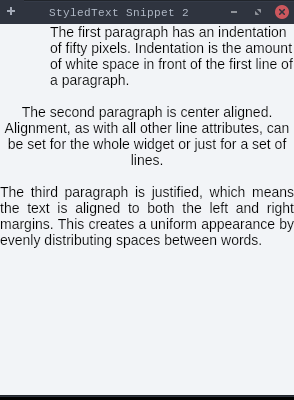
packagedev.equo;importdev.equo.swt.Config;importorg.eclipse.swt.SWT;importorg.eclipse.swt.custom.StyleRange;importorg.eclipse.swt.custom.StyledText;importorg.eclipse.swt.layout.FillLayout;importorg.eclipse.swt.widgets.Display;importorg.eclipse.swt.widgets.Shell;/** * Demonstrates text paragraph formatting with SWT StyledText widget. * This example shows different paragraph-level formatting options: * - First paragraph: 50-pixel indentation from the left margin * - Second paragraph: Center alignment * - Third paragraph: Justified text alignment (text aligned to both margins) * The text content explains each formatting feature while demonstrating it visually. */publicclassStyledTextSnippet2{staticStringtext="The first paragraph has an indentation of fifty pixels. Indentation is the amount of white space in front of the first line of a paragraph.\n\n"+"The second paragraph is center aligned. Alignment, as with all other line attributes, can be set for the whole widget or just for a set of lines.\n\n"+"The third paragraph is justified, which means the text is aligned to both the left and right margins. This creates a uniform appearance by evenly distributing spaces between words.";publicstaticvoidmain(String[]args)throwsClassNotFoundException{Config.useEquo(StyledText.class);Config.useEquo(Class.forName("org.eclipse.swt.custom.StyledTextRenderer"));Config.useEquo(StyleRange.class);Displaydisplay=newDisplay();Shellshell=newShell(display);shell.setText("StyledText Snippet 2");shell.setLayout(newFillLayout());StyledTextstyledText=newStyledText(shell,SWT.WRAP|SWT.BORDER);styledText.setText(text);styledText.setLineIndent(0,1,50);styledText.setLineAlignment(2,1,SWT.CENTER);styledText.setLineJustify(4,1,true);shell.setSize(300,400);shell.open();while(!shell.isDisposed()){if(!display.readAndDispatch())display.sleep();}display.dispose();}}
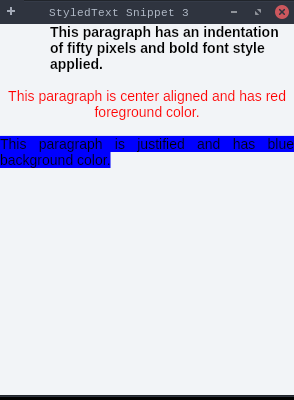
packagedev.equo;importdev.equo.swt.Config;importorg.eclipse.swt.SWT;importorg.eclipse.swt.custom.StyleRange;importorg.eclipse.swt.custom.StyledText;importorg.eclipse.swt.layout.FillLayout;importorg.eclipse.swt.widgets.Display;importorg.eclipse.swt.widgets.Shell;/** * Combines character-level styling with paragraph-level formatting in SWT StyledText. * This example demonstrates both types of formatting applied together: * Character-level styling: * - First paragraph: Bold font style applied to specific text range * - Second paragraph: Red foreground color applied to specific text range * - Third paragraph: Blue background color applied to specific text range * Paragraph-level formatting: * - First paragraph: 50-pixel left indentation * - Second paragraph: Center alignment * - Third paragraph: Justified alignment */publicclassStyledTextSnippet3{staticStringtext="This paragraph has an indentation of fifty pixels and bold font style applied.\n\n"+"This paragraph is center aligned and has red foreground color.\n\n"+"This paragraph is justified and has blue background color.";publicstaticvoidmain(String[]args)throwsClassNotFoundException{Config.useEquo(StyledText.class);Config.useEquo(Class.forName("org.eclipse.swt.custom.StyledTextRenderer"));Config.useEquo(StyleRange.class);Displaydisplay=newDisplay();Shellshell=newShell(display);shell.setText("StyledText Snippet 3");shell.setLayout(newFillLayout());StyledTextstyledText=newStyledText(shell,SWT.WRAP|SWT.BORDER);styledText.setText(text);StyleRangestyle1=newStyleRange();style1.start=0;style1.length=78;style1.fontStyle=SWT.BOLD;styledText.setStyleRange(style1);StyleRangestyle2=newStyleRange();style2.start=80;style2.length=62;style2.foreground=display.getSystemColor(SWT.COLOR_RED);styledText.setStyleRange(style2);StyleRangestyle3=newStyleRange();style3.start=144;style3.length=58;style3.background=display.getSystemColor(SWT.COLOR_BLUE);styledText.setStyleRange(style3);styledText.setLineIndent(0,1,50);styledText.setLineAlignment(2,1,SWT.CENTER);styledText.setLineJustify(4,1,true);shell.setSize(300,400);shell.open();while(!shell.isDisposed()){if(!display.readAndDispatch())display.sleep();}display.dispose();}}
packagedev.equo;importdev.equo.swt.Config;importorg.eclipse.swt.SWT;importorg.eclipse.swt.custom.StyleRange;importorg.eclipse.swt.custom.StyledText;importorg.eclipse.swt.layout.FillLayout;importorg.eclipse.swt.widgets.Display;importorg.eclipse.swt.widgets.Shell;/** * Demonstrates an editable StyledText widget with user interaction capabilities. * This example shows: * - A StyledText widget that allows user input and text editing * - Bold formatting applied to the entire initial text content * - Interactive text editing where users can click anywhere to position the caret * - Full editing capabilities including typing, deleting, and modifying text * The text content explains its own interactive features to guide user interaction. */publicclassStyledTextSnippet4{publicstaticvoidmain(String[]args)throwsClassNotFoundException{Config.useEquo(StyledText.class);Config.useEquo(Class.forName("org.eclipse.swt.custom.StyledTextRenderer"));Config.useEquo(StyleRange.class);Displaydisplay=newDisplay();Shellshell=newShell(display);shell.setText("StyledText Snippet 4");shell.setLayout(newFillLayout());StyledTexttext=newStyledText(shell,SWT.BORDER);text.setText("This text is editable. You may click at any part of it to change caret location and start modifying its content");StyleRangestyle1=newStyleRange();style1.start=0;style1.length=text.getCharCount();style1.fontStyle=SWT.BOLD;text.setStyleRange(style1);shell.setSize(500,80);shell.open();while(!shell.isDisposed()){if(!display.readAndDispatch())display.sleep();}display.dispose();}}
packagedev.equo;importdev.equo.swt.Config;importorg.eclipse.swt.SWT;importorg.eclipse.swt.custom.StyleRange;importorg.eclipse.swt.custom.StyledText;importorg.eclipse.swt.layout.FillLayout;importorg.eclipse.swt.widgets.Display;importorg.eclipse.swt.widgets.Shell;/** * Demonstrates a read-only StyledText widget that prevents user editing. * This example shows: * - A StyledText widget with editing disabled using setEditable(false) * - Bold formatting applied to the entire text content * - Text content that explains its read-only nature * - Users can still select text and navigate with the cursor, but cannot modify the content * Useful for displaying formatted text that should not be editable, like help text or status messages. */publicclassStyledTextSnippet5{publicstaticvoidmain(String[]args)throwsClassNotFoundException{Config.useEquo(StyledText.class);Config.useEquo(Class.forName("org.eclipse.swt.custom.StyledTextRenderer"));Config.useEquo(StyleRange.class);Displaydisplay=newDisplay();Shellshell=newShell(display);shell.setText("StyledText Snippet 5");shell.setLayout(newFillLayout());StyledTexttext=newStyledText(shell,SWT.BORDER);text.setText("This text is not editable, which means you can't modify its content");StyleRangestyle1=newStyleRange();style1.start=0;style1.length=text.getCharCount();style1.fontStyle=SWT.BOLD;text.setStyleRange(style1);text.setEditable(false);shell.pack();shell.open();while(!shell.isDisposed()){if(!display.readAndDispatch())display.sleep();}display.dispose();}}
packagedev.equo;importdev.equo.swt.Config;importorg.eclipse.swt.SWT;importorg.eclipse.swt.custom.StyleRange;importorg.eclipse.swt.custom.StyledText;importorg.eclipse.swt.graphics.Color;importorg.eclipse.swt.graphics.Font;importorg.eclipse.swt.layout.FillLayout;importorg.eclipse.swt.widgets.Display;importorg.eclipse.swt.widgets.Shell;/** * Demonstrates StyledText with different fonts, colors, and styles applied to different portions of text. * This example shows how to apply: * - Different font sizes (8pt, 12pt, 18pt, 24pt) * - Different font families * - Combined font styles (bold, italic) * - Different foreground colors * - Different background colors */publicclassStyledTextSnippet6{publicstaticvoidmain(String[]args)throwsClassNotFoundException{Config.useEquo(StyledText.class);Config.useEquo(Class.forName("org.eclipse.swt.custom.StyledTextRenderer"));Config.useEquo(StyleRange.class);Displaydisplay=newDisplay();Shellshell=newShell(display);shell.setText("StyledText Snippet 6 - Fonts, Colors & Styles");shell.setLayout(newFillLayout());shell.setSize(700,250);StyledTexttext=newStyledText(shell,SWT.BORDER|SWT.WRAP);text.setText("Red 8pt - Blue Italic 12pt - Green Bold 18pt - Purple Bold Italic 24pt - Yellow on Black");// ColorsColorred=newColor(display,255,0,0);Colorblue=newColor(display,0,0,255);Colorgreen=newColor(display,0,128,0);Colorpurple=newColor(display,128,0,128);Coloryellow=newColor(display,255,255,0);Colorblack=newColor(display,0,0,0);// Text: "Red 8pt - Blue Italic 12pt - Green Bold 18pt - Purple Bold Italic 24pt - Yellow on Black"// Indices: 0-6 "Red 8pt", 10-25 "Blue Italic 12pt", 29-43 "Green Bold 18pt", 47-69 "Purple Bold Italic 24pt", 73-87 "Yellow on Black"// Style 1: Small red font (8pt)StyleRangestyle1=newStyleRange();style1.start=0;style1.length=7;// "Red 8pt"style1.font=newFont(display,"Arial",8,SWT.NORMAL);style1.foreground=red;text.setStyleRange(style1);// Style 2: Blue italic font (12pt)StyleRangestyle2=newStyleRange();style2.start=10;style2.length=16;// "Blue Italic 12pt"style2.font=newFont(display,"Arial",12,SWT.ITALIC);style2.foreground=blue;text.setStyleRange(style2);// Style 3: Green bold font (18pt)StyleRangestyle3=newStyleRange();style3.start=29;style3.length=15;// "Green Bold 18pt"style3.font=newFont(display,"Arial",18,SWT.BOLD);style3.foreground=green;text.setStyleRange(style3);// Style 4: Purple bold italic font (24pt)StyleRangestyle4=newStyleRange();style4.start=47;style4.length=23;// "Purple Bold Italic 24pt"style4.font=newFont(display,"Arial",24,SWT.BOLD|SWT.ITALIC);style4.foreground=purple;text.setStyleRange(style4);// Style 5: Yellow text on black backgroundStyleRangestyle5=newStyleRange();style5.start=73;style5.length=15;// "Yellow on Black"style5.font=newFont(display,"Arial",14,SWT.BOLD);style5.foreground=yellow;style5.background=black;text.setStyleRange(style5);shell.open();while(!shell.isDisposed()){if(!display.readAndDispatch())display.sleep();}display.dispose();}}
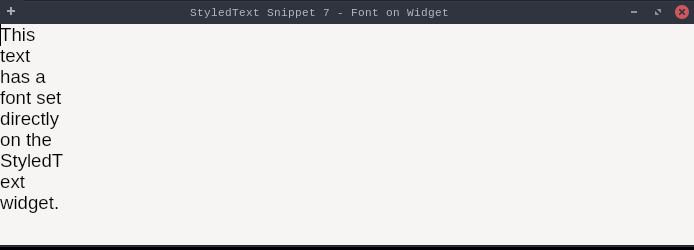
packagedev.equo;importdev.equo.swt.Config;importorg.eclipse.swt.SWT;importorg.eclipse.swt.custom.StyleRange;importorg.eclipse.swt.custom.StyledText;importorg.eclipse.swt.graphics.Font;importorg.eclipse.swt.layout.FillLayout;importorg.eclipse.swt.widgets.Display;importorg.eclipse.swt.widgets.Shell;/** * Reproduces the SwtFontData serialization issue: * Sets a font directly on the StyledText widget (like Eclipse editor does), * which triggers serialization of a SwtFont/SwtFontData. */publicclassStyledTextSnippet7{publicstaticvoidmain(String[]args)throwsClassNotFoundException{Config.useEquo(StyledText.class);Config.useEquo(Class.forName("org.eclipse.swt.custom.StyledTextRenderer"));Config.useEquo(StyleRange.class);Displaydisplay=newDisplay();Shellshell=newShell(display);shell.setText("StyledText Snippet 7 - Font on Widget");shell.setLayout(newFillLayout());shell.setSize(700,250);StyledTexttext=newStyledText(shell,SWT.BORDER|SWT.WRAP);text.setText("This text has a font set directly on the StyledText widget.");// Set font directly on the widget (like Eclipse editor does)text.setFont(newFont(display,"Consolas",14,SWT.NORMAL));shell.open();while(!shell.isDisposed()){if(!display.readAndDispatch())display.sleep();}display.dispose();}}
packagedev.equo;importdev.equo.swt.Config;importorg.eclipse.swt.SWT;importorg.eclipse.swt.custom.StyleRange;importorg.eclipse.swt.custom.StyledText;importorg.eclipse.swt.graphics.Font;importorg.eclipse.swt.layout.FillLayout;importorg.eclipse.swt.widgets.Display;importorg.eclipse.swt.widgets.Shell;/** * Demonstrates font styling in StyledText via StyleRange.font. * Each line uses a different font family, size, or style to show how * per-run font overrides interact with the widget's base font: * - Arial 14 normal * - Arial 16 bold * - Courier New 13 normal (monospace) * - Courier New 13 bold * - Times New Roman 15 italic * - Times New Roman 15 bold+italic * - Verdana 12 normal * - Helvetica 14 normal */publicclassStyledTextSnippet8{staticfinalStringTEXT="Arial 14 — The quick brown fox jumps over the lazy dog\n"+"Arial 16 Bold — The quick brown fox jumps over the lazy dog\n"+"Courier New 13 — The quick brown fox jumps over the lazy dog\n"+"Courier New 13 Bold — The quick brown fox jumps over the lazy dog\n"+"Times New Roman 15 Italic — The quick brown fox jumps over the lazy dog\n"+"Times New Roman 15 Bold+Italic — The quick brown fox jumps over the lazy dog\n"+"Verdana 12 — The quick brown fox jumps over the lazy dog\n"+"Helvetica 14 — The quick brown fox jumps over the lazy dog";publicstaticvoidmain(String[]args)throwsClassNotFoundException{Config.forceEquo();Displaydisplay=newDisplay();Shellshell=newShell(display);shell.setText("StyledText Snippet 8 — Font showcase");shell.setLayout(newFillLayout());shell.setSize(620,340);StyledTextstyledText=newStyledText(shell,SWT.BORDER|SWT.V_SCROLL);styledText.setText(TEXT);Fontarial14=newFont(display,"Arial",14,SWT.NORMAL);Fontarial16Bold=newFont(display,"Arial",16,SWT.BOLD);Fontcourier13=newFont(display,"Courier New",13,SWT.NORMAL);Fontcourier13Bold=newFont(display,"Courier New",13,SWT.BOLD);Fonttimes15Italic=newFont(display,"Times New Roman",15,SWT.ITALIC);Fonttimes15BoldItal=newFont(display,"Times New Roman",15,SWT.BOLD|SWT.ITALIC);Fontverdana12=newFont(display,"Verdana",12,SWT.NORMAL);Fonthelvetica14=newFont(display,"Helvetica",14,SWT.NORMAL);String[]lines=TEXT.split("\n");intoffset=0;Font[]fonts={arial14,arial16Bold,courier13,courier13Bold,times15Italic,times15BoldItal,verdana12,helvetica14};for(inti=0;i<lines.length;i++){StyleRangerange=newStyleRange();range.start=offset;range.length=lines[i].length();range.font=fonts[i];range.foreground=display.getSystemColor(SWT.COLOR_BLACK);styledText.setStyleRange(range);offset+=lines[i].length()+1;// +1 for '\n'}shell.open();while(!shell.isDisposed()){if(!display.readAndDispatch())display.sleep();}arial14.dispose();arial16Bold.dispose();courier13.dispose();courier13Bold.dispose();times15Italic.dispose();times15BoldItal.dispose();verdana12.dispose();helvetica14.dispose();display.dispose();}}