packagedev.equo;importdev.equo.swt.Config;importorg.eclipse.swt.SWT;importorg.eclipse.swt.custom.CTabFolder;importorg.eclipse.swt.custom.CTabItem;importorg.eclipse.swt.layout.GridData;importorg.eclipse.swt.layout.GridLayout;importorg.eclipse.swt.widgets.*;/** * Snippet to reproduce CTabFolder/CTabItem issues: * 1. Tab font color appears inactive (gray) even when selected * 2. After closing a tab via the close button, the tab stays visible * * Steps to reproduce: * - Click on different tabs to observe font color * - Click the X button on a tab to close it * - Observe if the tab disappears correctly */publicclassCTabFolderCloseTabSnippet{publicstaticvoidmain(String[]args){Displaydisplay=newDisplay();Shellshell=newShell(display);shell.setText("CTabFolder Close Tab Bug");shell.setLayout(newGridLayout());CTabFolderfolder=newCTabFolder(shell,SWT.BORDER|SWT.CLOSE);folder.setLayoutData(newGridData(SWT.FILL,SWT.FILL,true,true));// Create tabs with close buttonfor(inti=0;i<5;i++){CTabItemitem=newCTabItem(folder,SWT.CLOSE);item.setText("Tab "+i);Texttext=newText(folder,SWT.MULTI|SWT.V_SCROLL);text.setText("Content of Tab "+i+"\n\nClick the X to close this tab.");item.setControl(text);}// Select first tabfolder.setSelection(0);shell.setSize(400,300);shell.open();while(!shell.isDisposed()){if(!display.readAndDispatch())display.sleep();}display.dispose();}}
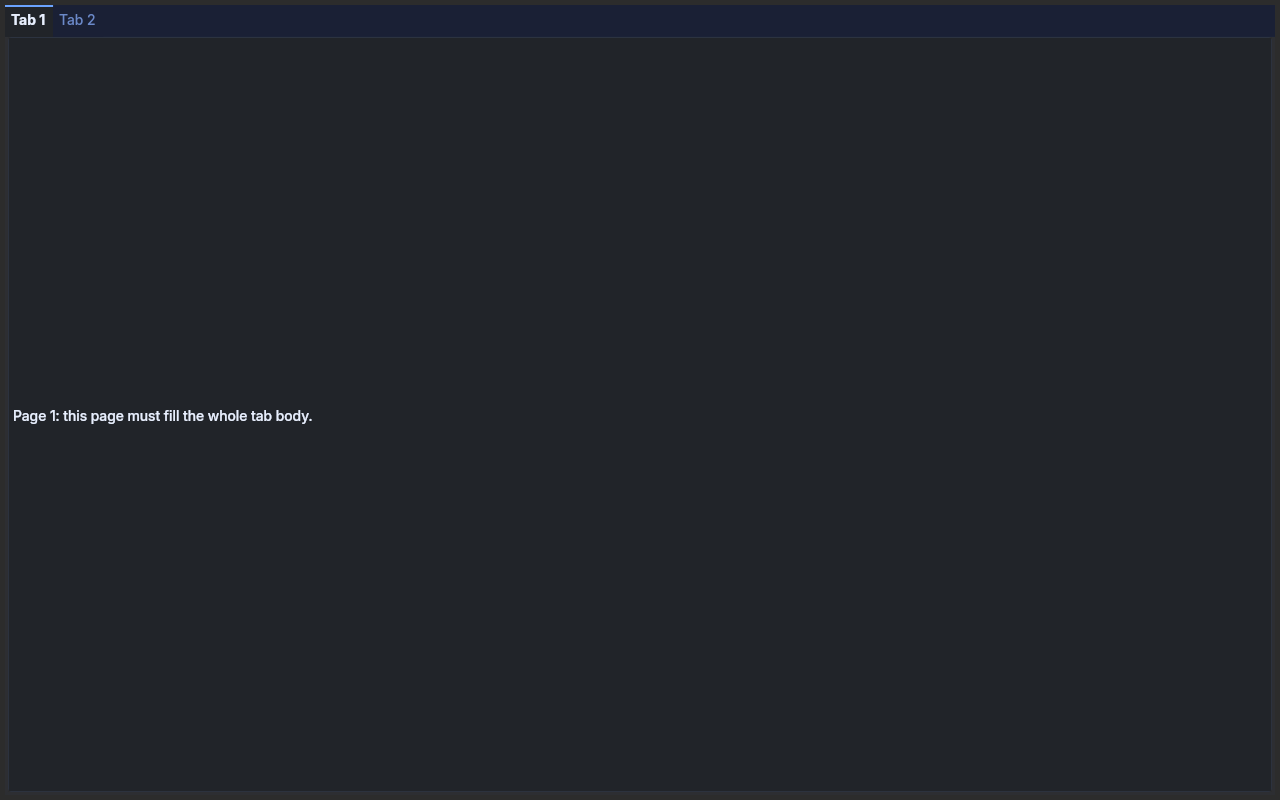
A CTabFolder whose selected page is laid out a turn after the folder itself is resized, as a
workbench does when it defers layout during a window resize.
Maximise or resize the window: the page (bordered) must fill the tab body every time,
without clicking a tab.
??? example "CTabFolderDeferredPageLayoutSnippet.java"
packagedev.equo;importdev.equo.swt.Config;importorg.eclipse.swt.SWT;importorg.eclipse.swt.custom.CTabFolder;importorg.eclipse.swt.custom.CTabItem;importorg.eclipse.swt.layout.FillLayout;importorg.eclipse.swt.layout.GridData;importorg.eclipse.swt.layout.GridLayout;importorg.eclipse.swt.widgets.*;/** * A CTabFolder whose selected page is laid out a turn after the folder itself is resized, as a * workbench does when it defers layout during a window resize. * * <p>Maximise or resize the window: the page (bordered) must fill the tab body every time, * without clicking a tab. */publicclassCTabFolderDeferredPageLayoutSnippet{publicstaticvoidmain(String[]args){Config.forceEquo();Displaydisplay=newDisplay();Shellshell=newShell(display);shell.setText("CTabFolder deferred page layout");shell.setLayout(newGridLayout());CTabFolderfolder=newCTabFolder(shell,SWT.BORDER);folder.setLayoutData(newGridData(SWT.FILL,SWT.FILL,true,true));for(inti=1;i<=2;i++){CTabItemitem=newCTabItem(folder,SWT.NONE);item.setText("Tab "+i);Compositepage=newComposite(folder,SWT.BORDER);page.setBackground(display.getSystemColor(SWT.COLOR_YELLOW));page.setLayout(newFillLayout());Labellabel=newLabel(page,SWT.WRAP);label.setBackground(display.getSystemColor(SWT.COLOR_YELLOW));label.setText("Page "+i+": this page must fill the whole tab body.");item.setControl(page);}folder.setSelection(0);shell.addListener(SWT.Resize,e->{if(folder.isLayoutDeferred())return;folder.setLayoutDeferred(true);display.timerExec(150,()->{if(folder.isDisposed())return;folder.setLayoutDeferred(false);System.out.println("folder="+folder.getBounds()+" page="+folder.getSelection().getControl().getBounds());});});shell.setSize(500,320);shell.open();while(!shell.isDisposed()){if(!display.readAndDispatch())display.sleep();}display.dispose();}}
[View on GitHub :simple-github:](https://github.com/equodev/swt-evolve/blob/main/examples/src/main/java/dev/equo/CTabFolderDeferredPageLayoutSnippet.java){ .md-button }
### Drag Drop Snippet
[](assets/screenshots/CTabFolderDragDropSnippet.png){.glightbox}
Drags a CTabItem from one CTabFolder onto another.
CTabFolder has no built-in cross-folder move: an application builds one on top of
DragSource/DropTarget, the way the Eclipse workbench moves a view between stacks — reparent
the tab's content Control and create a CTabItem in the target folder. A folder that has a
DropTarget owns every drop on its tab row, including a move within itself, so this snippet
handles both cases through the same {@link #moveTab} call.
??? example "CTabFolderDragDropSnippet.java"
packagedev.equo;importdev.equo.swt.Config;importorg.eclipse.swt.SWT;importorg.eclipse.swt.custom.CTabFolder;importorg.eclipse.swt.custom.CTabItem;importorg.eclipse.swt.dnd.DND;importorg.eclipse.swt.dnd.DragSource;importorg.eclipse.swt.dnd.DragSourceAdapter;importorg.eclipse.swt.dnd.DragSourceEvent;importorg.eclipse.swt.dnd.DropTarget;importorg.eclipse.swt.dnd.DropTargetAdapter;importorg.eclipse.swt.dnd.DropTargetEvent;importorg.eclipse.swt.dnd.TextTransfer;importorg.eclipse.swt.layout.FillLayout;importorg.eclipse.swt.widgets.Control;importorg.eclipse.swt.widgets.Display;importorg.eclipse.swt.widgets.Label;importorg.eclipse.swt.widgets.Shell;/** * Drags a CTabItem from one CTabFolder onto another. * * <p>CTabFolder has no built-in cross-folder move: an application builds one on top of * DragSource/DropTarget, the way the Eclipse workbench moves a view between stacks — reparent * the tab's content Control and create a CTabItem in the target folder. A folder that has a * DropTarget owns every drop on its tab row, including a move within itself, so this snippet * handles both cases through the same {@link #moveTab} call. */publicclassCTabFolderDragDropSnippet{/** * The tab in flight. TextTransfer only has to carry something for the type negotiation; the * item itself never leaves the process, the same split JFace's LocalSelectionTransfer makes. */privatestaticCTabItemdragged;publicstaticvoidmain(String[]args){Config.useEquo(CTabFolder.class);Displaydisplay=newDisplay();Shellshell=newShell(display);shell.setText("CTabFolderDragDropSnippet");shell.setLayout(newFillLayout(SWT.HORIZONTAL));shell.setSize(700,300);addDragAndDrop(createFolder(shell,"Left",3));addDragAndDrop(createFolder(shell,"Right",2));shell.open();while(!shell.isDisposed()){if(!display.readAndDispatch()){display.sleep();}}display.dispose();}privatestaticCTabFoldercreateFolder(Shellshell,Stringprefix,intcount){CTabFolderfolder=newCTabFolder(shell,SWT.BORDER);for(inti=0;i<count;i++){CTabItemitem=newCTabItem(folder,SWT.NONE);item.setText(prefix+" "+(i+1));Labelcontent=newLabel(folder,SWT.CENTER);content.setText("Content of "+item.getText());item.setControl(content);}folder.setSelection(0);returnfolder;}privatestaticvoidaddDragAndDrop(CTabFolderfolder){DragSourcesource=newDragSource(folder,DND.DROP_MOVE);source.setTransfer(TextTransfer.getInstance());source.addDragListener(newDragSourceAdapter(){@OverridepublicvoiddragStart(DragSourceEventevent){dragged=folder.getSelection();event.doit=dragged!=null;}@OverridepublicvoiddragSetData(DragSourceEventevent){event.data=dragged!=null?dragged.getText():"";}});DropTargettarget=newDropTarget(folder,DND.DROP_MOVE);target.setTransfer(TextTransfer.getInstance());target.addDropListener(newDropTargetAdapter(){@Overridepublicvoiddrop(DropTargetEventevent){if(dragged==null||dragged.isDisposed())return;// event.item is the tab under the cursor; no tab there means the drop landed// past the last one, so the moved tab goes to the end.intindex=event.iteminstanceofCTabItemhovered?folder.indexOf(hovered):folder.getItemCount();moveTab(dragged,folder,index);dragged=null;}});}privatestaticvoidmoveTab(CTabItemitem,CTabFoldertarget,intindex){CTabFoldersource=item.getParent();Stringtext=item.getText();Controlcontent=item.getControl();intremoved=source.indexOf(item);// Detach the content before disposing the item so the old folder stops laying it out// (destroying the selected item moves the selection, which hides its control).item.setControl(null);item.dispose();if(source==target&&removed<index)index--;if(content!=null&&!content.isDisposed())content.setParent(target);CTabItemmoved=newCTabItem(target,SWT.NONE,Math.max(0,Math.min(index,target.getItemCount())));moved.setText(text);moved.setControl(content);target.setSelection(moved);target.layout(true,true);}}
[View on GitHub :simple-github:](https://github.com/equodev/swt-evolve/blob/main/examples/src/main/java/dev/equo/CTabFolderDragDropSnippet.java){ .md-button }
### Snippet
[](assets/screenshots/CTabFolderSnippet.png){.glightbox}
Demonstrates the use of CTabFolder (Custom Tab Folder) widget in SWT.
This example creates a tab folder with 8 tabs, each containing a text area with sample content.
The tab folder includes:
- Minimize/maximize buttons in the tab bar
- Support for minimizing, maximizing, and restoring the tab folder
- Multi-line text content in each tab with scrollbars
- Custom styling with borders and proper layout management
??? example "CTabFolderSnippet.java"
packagedev.equo;importdev.equo.swt.Config;importorg.eclipse.swt.SWT;importorg.eclipse.swt.custom.CTabFolder;importorg.eclipse.swt.custom.CTabFolder2Adapter;importorg.eclipse.swt.custom.CTabFolderEvent;importorg.eclipse.swt.custom.CTabItem;importorg.eclipse.swt.layout.GridData;importorg.eclipse.swt.layout.GridLayout;importorg.eclipse.swt.widgets.*;/** * Demonstrates the use of CTabFolder (Custom Tab Folder) widget in SWT. * This example creates a tab folder with 8 tabs, each containing a text area with sample content. * The tab folder includes: * - Minimize/maximize buttons in the tab bar * - Support for minimizing, maximizing, and restoring the tab folder * - Multi-line text content in each tab with scrollbars * - Custom styling with borders and proper layout management */publicclassCTabFolderSnippet{publicstaticvoidmain(String[]args){Displaydisplay=newDisplay();finalShellshell=newShell(display);shell.setText("CTabFolderSnippet");shell.setLayout(newGridLayout());finalCTabFolderfolder=newCTabFolder(shell,SWT.BORDER);folder.setLayoutData(newGridData(SWT.FILL,SWT.FILL,true,true));folder.setSimple(false);folder.setUnselectedImageVisible(false);folder.setUnselectedCloseVisible(false);for(inti=0;i<8;i++){CTabItemitem=newCTabItem(folder,SWT.NONE);item.setText("Item "+i);Texttext=newText(folder,SWT.MULTI|SWT.V_SCROLL|SWT.H_SCROLL);text.setText("Text for item "+i+"\n\none, two, three\n\nabcdefghijklmnop");item.setControl(text);}shell.setSize(350,300);shell.open();while(!shell.isDisposed()){if(!display.readAndDispatch())display.sleep();}display.dispose();}}
[View on GitHub :simple-github:](https://github.com/equodev/swt-evolve/blob/main/examples/src/main/java/dev/equo/CTabFolderSnippet.java){ .md-button }
### Top Right Reserve Space Snippet
[](assets/screenshots/CTabFolderTopRightReserveSpaceSnippet.png){.glightbox}
With several tabs open and a narrow window, the topRight toolbar floats on top of
the tab row and can hide tabs underneath it with no way to reach them. Default
behaviour, unchanged. Pass -Dswt.evolve.ctabfolder_topright_auto_hide=false to
compare against the fix (toolbar always shown, reserving its own space instead of
floating).
??? example "CTabFolderTopRightReserveSpaceSnippet.java"
packagedev.equo;importdev.equo.swt.Config;importorg.eclipse.swt.SWT;importorg.eclipse.swt.custom.CTabFolder;importorg.eclipse.swt.custom.CTabItem;importorg.eclipse.swt.events.ControlAdapter;importorg.eclipse.swt.events.ControlEvent;importorg.eclipse.swt.graphics.Point;importorg.eclipse.swt.layout.FillLayout;importorg.eclipse.swt.layout.GridData;importorg.eclipse.swt.layout.GridLayout;importorg.eclipse.swt.widgets.Composite;importorg.eclipse.swt.widgets.Display;importorg.eclipse.swt.widgets.Label;importorg.eclipse.swt.widgets.Shell;importorg.eclipse.swt.widgets.ToolBar;importorg.eclipse.swt.widgets.ToolItem;/** * With several tabs open and a narrow window, the topRight toolbar floats on top of * the tab row and can hide tabs underneath it with no way to reach them. Default * behaviour, unchanged. Pass -Dswt.evolve.ctabfolder_topright_auto_hide=false to * compare against the fix (toolbar always shown, reserving its own space instead of * floating). */publicclassCTabFolderTopRightReserveSpaceSnippet{publicstaticvoidmain(String[]args){Config.forceEquo();// Forced on for both runs of this snippet: makes the topRight toolbar// render without needing a live mouse hover even in the default (hover-only)// mode. ctabfolder_topright_auto_hide is the actual variable under// comparison -- pass -Dswt.evolve.ctabfolder_topright_auto_hide=false to// see the fix.System.setProperty("swt.evolve.ctabfolder_visible_controls","true");Displaydisplay=newDisplay();Shellshell=newShell(display);shell.setText("CTabFolder TopRight Reserve-Space Snippet -- auto_hide="+Boolean.parseBoolean(System.getProperty("swt.evolve.ctabfolder_topright_auto_hide","true")));shell.setLayout(newGridLayout());finalPointpinnedSize=newPoint(300,250);shell.setSize(pinnedSize);// The desktop harness's DPI/monitor negotiation drifts the shell size upward// over the first couple seconds if left alone -- pin it back on every resize// so the narrow-window scenario this snippet exists to show actually holds.shell.addControlListener(newControlAdapter(){@OverridepublicvoidcontrolResized(ControlEvente){if(!shell.getSize().equals(pinnedSize)){shell.setSize(pinnedSize);}}});CTabFoldertabFolder=newCTabFolder(shell,SWT.BORDER);tabFolder.setLayoutData(newGridData(SWT.FILL,SWT.FILL,true,true));CompositetoolbarComposite=newComposite(tabFolder,SWT.NONE);FillLayouttoolbarLayout=newFillLayout();toolbarLayout.marginHeight=2;toolbarLayout.marginWidth=4;toolbarComposite.setLayout(toolbarLayout);ToolBartoolBar=newToolBar(toolbarComposite,SWT.FLAT);ToolItemitemA=newToolItem(toolBar,SWT.PUSH);itemA.setText("Refresh");ToolItemitemB=newToolItem(toolBar,SWT.PUSH);itemB.setText("Settings");tabFolder.setTopRight(toolbarComposite);for(inti=1;i<=8;i++){CTabItemtab=newCTabItem(tabFolder,SWT.NONE);tab.setText("Tab "+i);Compositebody=newComposite(tabFolder,SWT.NONE);body.setLayout(newFillLayout());newLabel(body,SWT.NONE).setText("Content of tab "+i);tab.setControl(body);}// Selects the last tab -- the one most likely to end up hidden underneath// the toolbar overlay when the tabs don't all fit.tabFolder.setSelection(tabFolder.getItemCount()-1);shell.open();while(!shell.isDisposed()){if(!display.readAndDispatch()){display.sleep();}}display.dispose();}}
[View on GitHub :simple-github:](https://github.com/equodev/swt-evolve/blob/main/examples/src/main/java/dev/equo/CTabFolderTopRightReserveSpaceSnippet.java){ .md-button }
### With Content Snippet
[](assets/screenshots/CTabFolderWithContentSnippet.png){.glightbox}
Example demonstrating CTabFolderWithContentSnippet.
??? example "CTabFolderWithContentSnippet.java"
packagedev.equo;importdev.equo.swt.Config;importorg.eclipse.swt.SWT;importorg.eclipse.swt.custom.CTabFolder;importorg.eclipse.swt.custom.CTabItem;importorg.eclipse.swt.layout.FillLayout;importorg.eclipse.swt.layout.GridData;importorg.eclipse.swt.layout.GridLayout;importorg.eclipse.swt.widgets.*;publicclassCTabFolderWithContentSnippet{privatestaticvoidlog(Stringmessage){System.out.println("[DEBUG] "+message);}publicstaticvoidmain(String[]args){System.setProperty("dev.equo.swt.debug","true");Config.forceEquo();// Config.defaultToEquo();Displaydisplay=newDisplay();Shellshell=newShell(display);shell.setText("CTabFolder Debug");shell.setLayout(newGridLayout());CTabFolderfolder=newCTabFolder(shell,SWT.BORDER);folder.setLayoutData(newGridData(SWT.FILL,SWT.FILL,true,true));log("CTabFolder created, clientArea: "+folder.getClientArea());// Tab with contentCTabItemitem=newCTabItem(folder,SWT.NONE);item.setText("Tab 1");Compositebody=newComposite(folder,SWT.BORDER);body.setLayout(newFillLayout());Texttext=newText(body,SWT.MULTI|SWT.V_SCROLL);text.setText("Tab 1 content\n\nLine 2\nLine 3");log("Before setControl - text bounds: "+text.getBounds());log("Before setControl - clientArea: "+folder.getClientArea());item.setControl(body);log("After setControl - text bounds: "+text.getBounds());log("After setControl - text visible: "+text.getVisible());folder.setSelection(0);log("After setSelection - text bounds: "+text.getBounds());log("After setSelection - text visible: "+text.getVisible());shell.setSize(400,300);shell.open();log("After open - clientArea: "+folder.getClientArea());log("After open - text bounds: "+text.getBounds());log("After open - text visible: "+text.getVisible());while(!shell.isDisposed()){if(!display.readAndDispatch())display.sleep();}display.dispose();}}
[View on GitHub :simple-github:](https://github.com/equodev/swt-evolve/blob/main/examples/src/main/java/dev/equo/CTabFolderWithContentSnippet.java){ .md-button }
### With Top Right Tool Bar Snippet
[](assets/screenshots/CTabFolderWithTopRightToolBarSnippet.png){.glightbox}
Demonstrates CTabFolder with an integrated toolbar in the top-right corner.
This example shows how to use setTopRight() method to embed a custom toolbar with different types of tool items including icons and tooltips.
??? example "CTabFolderWithTopRightToolBarSnippet.java"
packagedev.equo;importdev.equo.swt.Config;importorg.eclipse.swt.SWT;importorg.eclipse.swt.custom.CTabFolder;importorg.eclipse.swt.custom.CTabItem;importorg.eclipse.swt.graphics.Image;importorg.eclipse.swt.layout.FillLayout;importorg.eclipse.swt.widgets.Composite;importorg.eclipse.swt.widgets.Display;importorg.eclipse.swt.widgets.Shell;importorg.eclipse.swt.widgets.ToolBar;importorg.eclipse.swt.widgets.ToolItem;importjava.io.IOException;importjava.io.InputStream;importjava.net.URL;importjava.nio.file.Files;importjava.nio.file.Path;importjava.nio.file.Paths;importjava.nio.file.StandardCopyOption;/** * Demonstrates CTabFolder with an integrated toolbar in the top-right corner. * This example shows how to use setTopRight() method to embed a custom toolbar with different types of tool items including icons and tooltips. */publicclassCTabFolderWithTopRightToolBarSnippet{publicstaticvoidmain(String[]args)throwsIOException{Config.forceEquo();System.setProperty("swt.evolve.ctabfolder_visible_controls","true");Displaydisplay=newDisplay();Shellshell=newShell(display);shell.setText("CTabFolder with Toolbar TopRight Snippet");shell.setSize(400,100);shell.setLayout(newFillLayout());CTabFoldertabFolder=newCTabFolder(shell,SWT.BORDER);//tabFolder.setMinimizeVisible(true);//tabFolder.setMaximizeVisible(true);CompositetoolbarComposite=newComposite(tabFolder,SWT.NONE);FillLayouttoolbarLayout=newFillLayout();toolbarLayout.marginHeight=2;toolbarLayout.marginWidth=2;toolbarComposite.setLayout(toolbarLayout);ToolBartoolBar=newToolBar(toolbarComposite,SWT.FLAT);ToolItemitemA=newToolItem(toolBar,SWT.PUSH);itemA.setText("A");itemA.setToolTipText("Item A");ToolItemcheck=newToolItem(toolBar,SWT.CHECK);check.setText("Check");check.setToolTipText("Check Item");check.setImage(newImage(display,getImagePath("synced.png")));ToolItembackward_forward=newToolItem(toolBar,SWT.PUSH);backward_forward.setToolTipText("backwards forward");backward_forward.setImage(newImage(display,getImagePath("backward_nav.png")));backward_forward.setHotImage(newImage(display,getImagePath("forward_nav.png")));ToolItemview_menu=newToolItem(toolBar,SWT.PUSH);view_menu.setToolTipText("view_menu");view_menu.setImage(newImage(display,getImagePath("view_menu.png")));tabFolder.setTopRight(toolbarComposite);CTabItemtab1=newCTabItem(tabFolder,SWT.NONE);tab1.setText("Tab 1");CTabItemtab2=newCTabItem(tabFolder,SWT.NONE);tab2.setText("Tab 2");tabFolder.setSelection(0);shell.open();while(!shell.isDisposed()){if(!display.readAndDispatch()){display.sleep();}}display.dispose();}privatestaticStringgetImagePath(StringimageName)throwsIOException{URLresourceUrl=CTabFolderWithTopRightToolBarSnippet.class.getResource("/"+imageName);if(resourceUrl==null){thrownewIllegalArgumentException("Resource not found: "+imageName);}if("file".equals(resourceUrl.getProtocol())){returnPaths.get(resourceUrl.getPath()).toString();}else{InputStreamis=CTabFolderWithTopRightToolBarSnippet.class.getResourceAsStream("/"+imageName);PathtmpDir=Files.createTempDirectory("swt-evolve-images-");PathtmpFile=tmpDir.resolve(imageName);assertis!=null;Files.copy(is,tmpFile,StandardCopyOption.REPLACE_EXISTING);tmpFile.toFile().deleteOnExit();returntmpFile.toAbsolutePath().toString();}}}
[View on GitHub :simple-github:](https://github.com/equodev/swt-evolve/blob/main/examples/src/main/java/dev/equo/CTabFolderWithTopRightToolBarSnippet.java){ .md-button }