FileDialog Examples
Instances of this class allow the user to navigate the file system and select or enter a file name.
Snippet
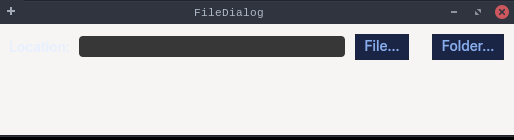
The shape Eclipse's "Define a New Path Variable" and "Add External Web Browser" dialogs use:
a read-write Location field with File.../Folder... buttons that open the system chooser with
{@link SWT#SHEET} and write whatever comes back into the field (null meaning cancelled).
Deliberately no {@code Config.forceEquo()}: in the whole-tree build Config routes the two
choosers to the OS on purpose, and that native path is what this snippet exercises.
??? example "FileDialogSnippet.java"
| package dev.equo;
import org.eclipse.swt.SWT;
import org.eclipse.swt.layout.GridData;
import org.eclipse.swt.layout.GridLayout;
import org.eclipse.swt.widgets.*;
/**
* The shape Eclipse's "Define a New Path Variable" and "Add External Web Browser" dialogs use:
* a read-write Location field with File.../Folder... buttons that open the system chooser with
* {@link SWT#SHEET} and write whatever comes back into the field (null meaning cancelled).
*
* <p>Deliberately no {@code Config.forceEquo()}: in the whole-tree build Config routes the two
* choosers to the OS on purpose, and that native path is what this snippet exercises.
*/
public class FileDialogSnippet {
public static void main(String[] args) {
Display display = new Display();
Shell shell = new Shell(display);
shell.setText("FileDialog");
shell.setLayout(new GridLayout(3, false));
new Label(shell, SWT.NONE).setText("Location:");
Text location = new Text(shell, SWT.BORDER);
location.setLayoutData(new GridData(SWT.FILL, SWT.CENTER, true, false));
Composite buttons = new Composite(shell, SWT.NONE);
buttons.setLayout(new GridLayout(2, true));
Button file = new Button(buttons, SWT.PUSH);
file.setText("File...");
file.addListener(SWT.Selection, e -> {
FileDialog dialog = new FileDialog(shell, SWT.SHEET);
dialog.setText("Select file");
dialog.setFilterPath(location.getText());
String picked = dialog.open();
System.out.println("FileDialog.open() -> " + picked);
if (picked != null)
location.setText(picked);
});
Button folder = new Button(buttons, SWT.PUSH);
folder.setText("Folder...");
folder.addListener(SWT.Selection, e -> {
DirectoryDialog dialog = new DirectoryDialog(shell, SWT.SHEET);
dialog.setText("Select folder");
dialog.setFilterPath(location.getText());
String picked = dialog.open();
System.out.println("DirectoryDialog.open() -> " + picked);
if (picked != null)
location.setText(picked);
});
shell.setSize(520, 140);
shell.open();
while (!shell.isDisposed()) {
if (!display.readAndDispatch()) display.sleep();
}
display.dispose();
}
}
|