Instances of the receiver represent a selectable user interface object that allows the user to drag a rubber banded outline of the sash within the parent control.
Form Snippet
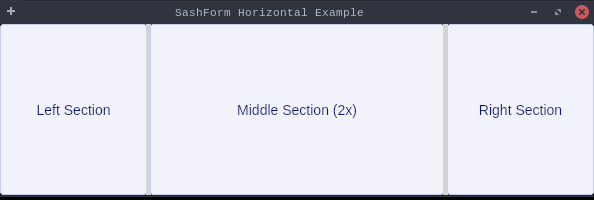
Demonstrates a horizontal SashForm with three resizable sections.
This example creates a shell with a SashForm containing three buttons.
Users can drag the sashes between sections to resize them.
The sections are initially sized with weights [1, 2, 1] meaning the middle
packagedev.equo;importdev.equo.swt.Config;importorg.eclipse.swt.SWT;importorg.eclipse.swt.custom.SashForm;importorg.eclipse.swt.layout.FillLayout;importorg.eclipse.swt.widgets.*;/** * Demonstrates a horizontal SashForm with three resizable sections. * This example creates a shell with a SashForm containing three buttons. * Users can drag the sashes between sections to resize them. * The sections are initially sized with weights [1, 2, 1] meaning the middle * section is twice as large as the side sections. */publicclassSashFormSnippet{publicstaticvoidmain(String[]args){Config.forceEquo();Displaydisplay=newDisplay();Shellshell=newShell(display);shell.setText("SashForm Horizontal Example");shell.setLayout(newFillLayout());// Create horizontal SashFormSashFormsashForm=newSashForm(shell,SWT.HORIZONTAL);// Add three buttons as childrenButtonbutton1=newButton(sashForm,SWT.PUSH);button1.setText("Left Section");Buttonbutton2=newButton(sashForm,SWT.PUSH);button2.setText("Middle Section (2x)");Buttonbutton3=newButton(sashForm,SWT.PUSH);button3.setText("Right Section");// Set weights: middle section is twice as widesashForm.setWeights(newint[]{1,2,1});shell.setSize(600,200);shell.open();while(!shell.isDisposed()){if(!display.readAndDispatch())display.sleep();}display.dispose();}}
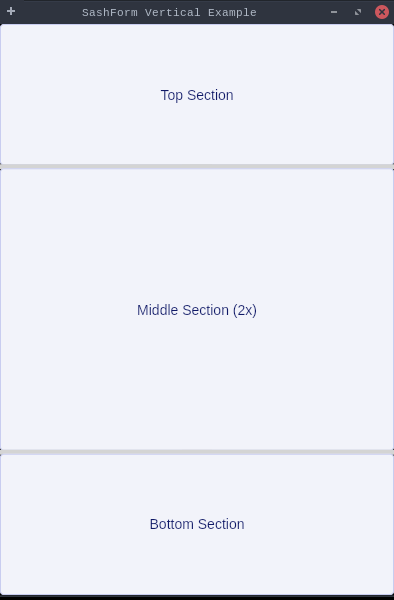
packagedev.equo;importdev.equo.swt.Config;importorg.eclipse.swt.SWT;importorg.eclipse.swt.custom.SashForm;importorg.eclipse.swt.layout.FillLayout;importorg.eclipse.swt.widgets.*;/** * Demonstrates a vertical SashForm with three resizable sections. * This example creates a shell with a SashForm containing three buttons. * Users can drag the sashes between sections to resize them. * The sections are initially sized with weights [1, 2, 1] meaning the middle * section is twice as large as the side sections. */publicclassSashFormVerticalSnippet{publicstaticvoidmain(String[]args){Config.forceEquo();Displaydisplay=newDisplay();Shellshell=newShell(display);shell.setText("SashForm Vertical Example");shell.setLayout(newFillLayout());// Create vertical SashFormSashFormsashForm=newSashForm(shell,SWT.VERTICAL);// Add three buttons as childrenButtonbutton1=newButton(sashForm,SWT.PUSH);button1.setText("Top Section");Buttonbutton2=newButton(sashForm,SWT.PUSH);button2.setText("Middle Section (2x)");Buttonbutton3=newButton(sashForm,SWT.PUSH);button3.setText("Bottom Section");// Set weights: middle section is twice as tallsashForm.setWeights(newint[]{1,2,1});shell.setSize(400,600);shell.open();while(!shell.isDisposed()){if(!display.readAndDispatch())display.sleep();}display.dispose();}}